How to set up Business Units
One customer account is one Marketing Tenant. When that customer is really several brands, dealerships, regions, or teams, Business Units divide the tenant into flat, isolated data scopes — so each unit sees and edits only its own Pages, email templates, campaigns, forms, subscriber lists, and documents, while the customer still administers one account.
What you'll build
Data segregation for a two-brand Marketing Tenant, from nothing to verified:
- Confirm your starting point — every tenant already has a Default Business Unit
- Have two Business Units created for the tenant
- Grant memberships so each user reaches the right units
- Understand Tenant Owner as a scope, not an admin role
- Switch the Active Business Unit and observe what happens to open editors
- Verify segregation from the API
- Share deliberately — tenant-owned resources, copies, and Business Unit Forks
Time to complete: 45-60 minutes, plus operator turnaround for Step 2
Prerequisites
- A Marketing Tenant you administer
- Conceptual background: Business Units
- A contact who can perform operator-side actions (creating Business Units, appointing Tenant Owners)
Terminology
Use these exact terms — the platform's behaviour only makes sense in this vocabulary.
| Term | Meaning |
|---|---|
| Marketing Tenant | The customer account, and the primary data-isolation boundary. One customer is one Marketing Tenant however many brands it has. |
| Business Unit | A flat, subordinate data-access scope inside one Marketing Tenant. Not a tenant, not an organisation, and there is deliberately no root Business Unit. |
| Default Business Unit | The single Business Unit present in every Marketing Tenant. It owns legacy data and anything with no explicit Business Unit. It is a compatibility boundary, not a mode; it cannot be renamed or archived. |
| Tenant Membership | An identity's explicit association with one Marketing Tenant. One membership can hold grants for many Business Units. |
| Business Unit Grant | The explicit association giving one Tenant Membership capabilities within one Business Unit. |
| Active Business Unit | The Business Unit currently selected for a user's requests. Accepted only when the membership has an active grant for it, or holds tenant-wide authority. |
| Tenant Owner | A membership whose reach is the whole Marketing Tenant — every active Business Unit, without holding a grant for any. A scope, not an admin role. |
| Tenant-owned Resource | Centrally governed and made available to Business Units to consume, without transferring edit authority. Approved templates, brand assets, Core Slice definitions, the Shared Asset Library. |
| Business Unit–owned Resource | Owned immutably by exactly one Business Unit. Ownership cannot be moved; placing a copy elsewhere means creating a distinct copy. |
| Core Slice or Block Definition | The canonical, tenant-owned Slice or Block definition every Business Unit renders. |
| Business Unit Fork | A separately identified, Business Unit–owned definition derived from a Core definition. It does not override or intercept the Core definition. |
Avoid these: "root Business Unit", "current tenant", "trusted UI filter", "implicit grant", and "tenant switch" when you mean switching the Active Business Unit (switching tenants is a different control, held server-side).
Step 1: Confirm your starting point
There is no global "enable Business Units" flag and no migration. Every tenant already has a Default Business Unit, and every pre-existing resource is Default-owned.
Consequences worth stating plainly to stakeholders before you begin:
- A tenant that never creates a second Business Unit keeps its exact single-tenant behaviour: one writable Default library, no switcher, no Shared section.
- Legacy rows read correctly afterwards, because Default is authorized for every authorized member and unscoped rows resolve to Default.
- Adoption is incremental at the resource level too. Existing Default files do not implicitly become cross-unit shared assets — you opt specific resources into Shared deliberately.
So a tenant "turns on" Business Units simply by creating a second one. Plan the split before you do: ownership is immutable, so a resource created in the wrong unit must be copied, not moved.
Step 2: Have the Business Units created
Creating, renaming, and archiving Business Units — and appointing Tenant Owners — is operator-side administration, performed in April9 Platform Administration rather than in your own instance.
Give your operator contact a list like this:
| Name | Slug | Notes |
|---|---|---|
| Northside Motors | northside | New |
| Southside Motors | southside | New |
| (Default) | — | Already exists; holds all pre-existing data |
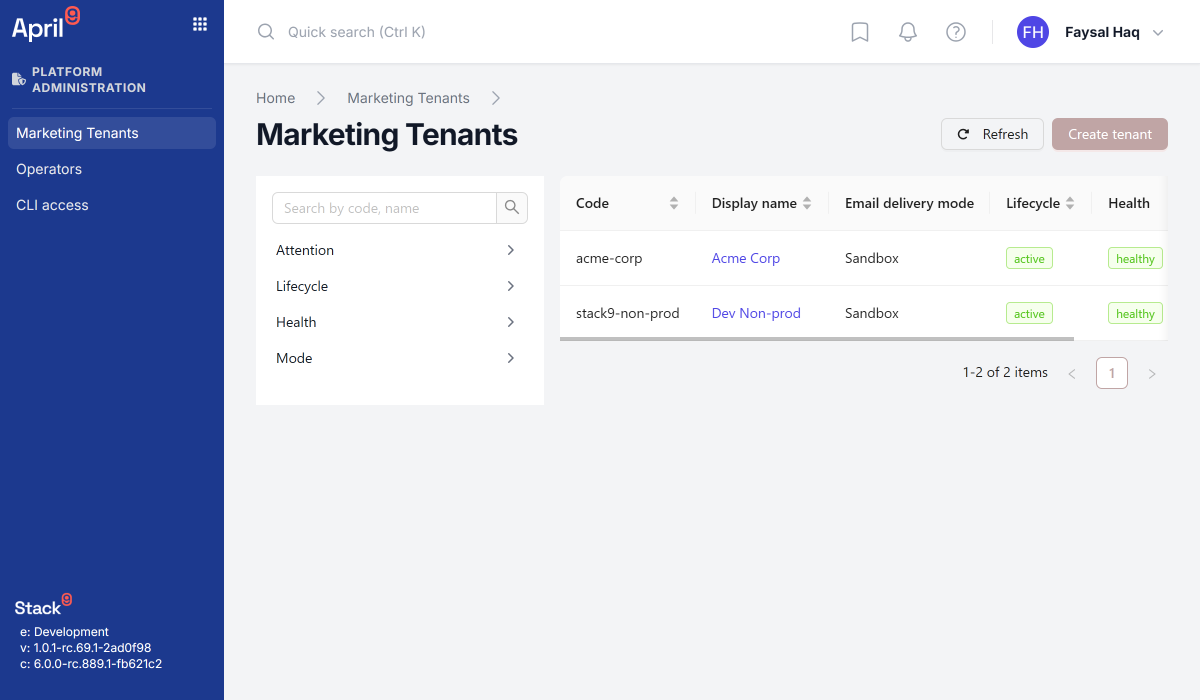
Once created, confirm they exist and are active by reading them back — this endpoint returns the caller's own authorized, active Business Units:
curl -X GET 'https://apis.app.stack9.co/api/client/v1/business-units' \
  -H 'X-API-Key: your-api-key-here'
{
  "business_units": [
    { "bu_id": "default", "name": "Default", "slug": "default", "is_default": true },
    { "bu_id": "bu_101", "name": "Northside Motors", "slug": "northside", "is_default": false },
    { "bu_id": "bu_102", "name": "Southside Motors", "slug": "southside", "is_default": false }
  ],
  "is_tenant_admin": true,
  "default_business_unit_id": "default"
}
Field notes:
is_tenant_adminis the wire name for Tenant Owner. The name overstates it — see Step 4.default_business_unit_idis what unscoped legacy rows fall back to.- This response is the set the switcher offers; it is never invented client-side.
/client/v1/* endpoints are consumed by your DXP instance to answer "what may I see?". Treat them as a verification and diagnostic surface here, and confirm with your Stack9 contact before building an external integration on them.
Step 3: Grant memberships
A Tenant Membership is created only by explicit assignment, and it starts carrying the Default Business Unit grant so tenant-wide shared assets are readable from day one. That grant is an ordinary grant — it can be removed later.
Assign existing Business Units to users from the user field on the settings user screen in your own instance:
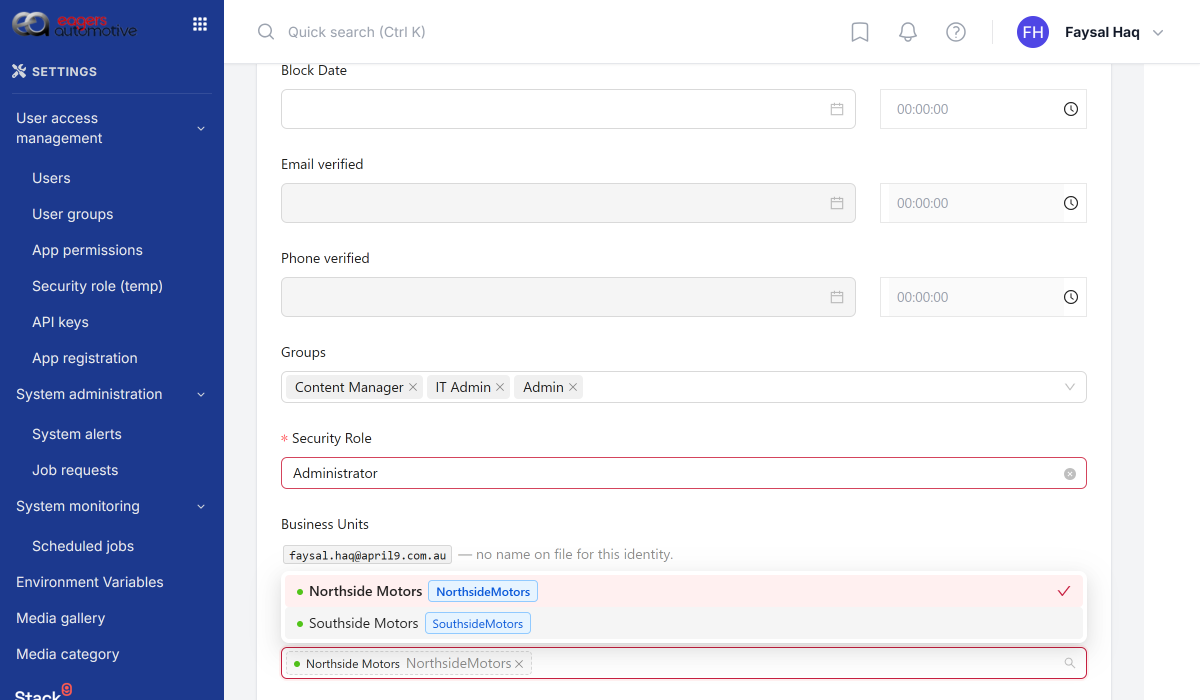
Design the grants deliberately:
| User | Grants | Effective reach |
|---|---|---|
| Northside marketer | Northside | Northside only |
| Southside marketer | Southside | Southside only |
| Group brand manager | Northside, Southside | Both, switching between them |
| Group operations lead | (Tenant Owner) | Every active Business Unit, no grants needed |
A membership with no explicit non-default grant resolves to Default. A membership may hold many grants and switch its Active Business Unit among them — the model is never one-user-to-one-unit.
Grants take effect on the member's next request. Nothing about a grant is cached across requests, so adding or revoking a grant needs no sign-out.
Verify a user's memberships:
curl -X GET 'https://apis.app.stack9.co/api/client/v1/my-memberships' \
  -H 'X-API-Key: your-api-key-here'
{
  "results": [
    {
      "tenant_id": "tenant_9001",
      "tenant_name": "Eagers Group",
      "tenant_code": "eagers",
      "is_tenant_admin": false,
      "status": "active"
    }
  ]
}
Step 4: Understand Tenant Owner
Tenant Owner is a scope, not an admin role. It means "this membership reaches every active Business Unit without holding a grant for any". It confers no authority to administer the tenant or change memberships.
What it does unlock: only a Tenant Owner may create or modify Shared (tenant-owned) items — the Shared Asset Library, approved templates, and other centrally governed resources.
Use it for the small number of people who genuinely need cross-brand reach: a group marketing lead, a shared-asset curator. Do not use it as a convenience to avoid modelling grants — it removes the isolation you are setting up.
The intended model names a Business Unit Administrator, Capabilities, Capability Roles, and System Role Templates. These are not shipped. Today, writes to Shared resources are gated on the Tenant Owner scope. Do not plan around a finer capability until it exists.
Step 5: Switch the Active Business Unit
Users with reach into several Business Units get a switcher. It offers their authorized, active units, Default first.
What happens on switch, and why each behaviour exists:
- The switch is authorized server-side. The selection is applied only when the platform confirms the membership may reach that unit.
- In-flight requests are discarded. A generation counter advances on switch and stale responses are dropped, so a response for the previous unit can never render under the new one.
- Open editors are exited, not retargeted. An open Pages editor navigates back to project selection and its draft unmounts. Unsaved edits are reported as discarded — never silently saved into the newly selected unit.
The Active Business Unit your browser sends is only ever a proposal. It travels inside a signed assertion scope, is stripped from the request body before validation, and is then re-authorized independently against the signed-in user's membership and grants on every request. A tampered value can never widen access.
Enforcement fails closed: an unauthorized caller receives an impossible predicate — an empty result set — never "no constraint". Missing configuration, no identity subject, or an upstream failure all yield an empty authorized set, and an outage is deliberately kept distinct from a denial so a user is never told "no access" because a service was down.
Also keep the Active Business Unit distinct from Tenant Selection, which is a multi-tenant Tenant Owner choosing which membership to act under. Different control, held server-side.
Step 6: Verify segregation
Test with real users, not by inspection. A minimal acceptance pass:
| Check | Expected result |
|---|---|
| Northside marketer lists forms | Only Northside forms, plus tenant-owned form themes |
| Northside marketer lists documents | Northside library, plus Shared, plus Default if granted |
| Northside marketer requests a Southside campaign by id | Not found — not "forbidden with a hint" |
| Group brand manager switches to Southside | Sees only Southside resources; any open editor exited |
| Anyone tampers with the Business Unit sent by the browser | No change in what is returned |
How scoping is applied, uniformly:
- Every resource carries an owning Business Unit. A null value means Default-owned — which is why legacy rows are byte-identical and their storage keys and URLs never changed.
- Reads are narrowed server-side, non-overridably: the scope predicate is nested beneath any client-supplied filter, so it can only ever narrow. A user sees the union of their authorized units, plus Shared, plus unscoped Default rows when Default is authorized.
- Writes are authorized against the resolved authority set, not the browser's proposal.
- Ownership is immutable. You cannot reassign a resource's Business Unit.
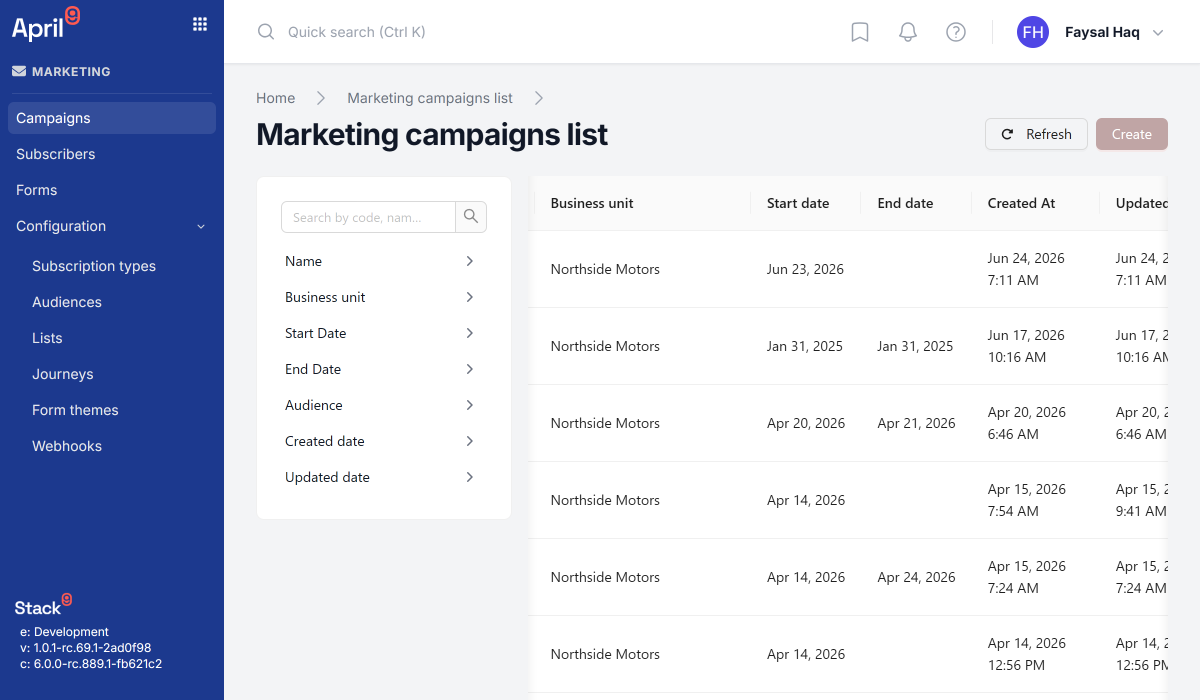
Documents Manager and Pages have the most complete, tested scope enforcement. Campaigns, Forms, and Email surface a Business Unit column and model field. Before you promise a specific guarantee for a specific product, verify its server-side read and write enforcement with your Stack9 contact rather than inferring it from the presence of the column.
Step 7: Share deliberately
Because ownership is immutable, "sharing" is always one of exactly three things.
1. Make it tenant-owned
Approved templates, brand assets, and the Shared Asset Library are tenant-owned: readable and selectable from every active Business Unit, writable only by a Tenant Owner. This is the right answer for anything that must stay consistent across brands.
Note the deliberate limit: Resource Availability — who may consume a resource — is separate from ownership, and availability never implies shared ownership.
2. Copy it
To place a Business Unit–owned resource in another unit, create a distinct copy. For a Pages project, run the preflight first — it enumerates private Documents Manager references that would leak across units and block the copy:
curl -X POST 'https://apis.app.stack9.co/api/pages/proj_7742/duplicate/preflight' \
  -H 'X-API-Key: your-api-key-here' \
  -H 'Content-Type: application/json' \
  -d '{ "target_business_unit_id": "bu_102" }'
{
  "ok": false,
  "source_project_id": "proj_7742",
  "target_business_unit_id": "bu_102",
  "blocking_references": [
    {
      "file_key": "bu:101/9f2c.../northside-hero.jpg",
      "url": "https://cdn.example.com/bu:101/9f2c.../northside-hero.jpg",
      "owner_business_unit_id": "bu_101",
      "document_id": "doc_5512",
      "document_name": "Home",
      "field_path": "slices[0].primary.image"
    }
  ],
  "allowed_reference_count": 24,
  "scanned_document_count": 12
}
Resolve each blocker — move the asset to Shared, or replace it in the target — then duplicate:
curl -X POST 'https://apis.app.stack9.co/api/pages/proj_7742/duplicate' \
  -H 'X-API-Key: your-api-key-here' \
  -H 'Content-Type: application/json' \
  -d '{
    "target_business_unit_id": "bu_102",
    "name": "Southside Motors Website"
  }'
The result is a new project, independently owned by the target unit, with a link back to the source it was duplicated from. Later changes to either project are independent.
Duplicate and its preflight exist as APIs, but there is no button for them in the Pages authoring UI — they are likely triggered from an administrative surface. Confirm how your tenant is expected to run them before writing them into a runbook.
3. Fork it (Slices only)
For components, the governed default is a Core Slice or Block Definition: tenant-owned, consumed by every Business Unit through its declared content and theme inputs. All units render the same definition identity, and a unit cannot structurally override it. That is how one component library stays consistent across every brand.
When a unit genuinely needs structural change, it creates a Business Unit Fork — a separately identified, unit-owned definition derived from a Core definition.
| Core Slice or Block Definition | Business Unit Fork | |
|---|---|---|
| Owner | Marketing Tenant | One Business Unit |
| Who may edit | Tenant Owner | The owning Business Unit |
| Relationship to Core | — | A tracked, independent copy |
| Receives Core updates | n/a | No |
| Can intercept or override Core | n/a | No |
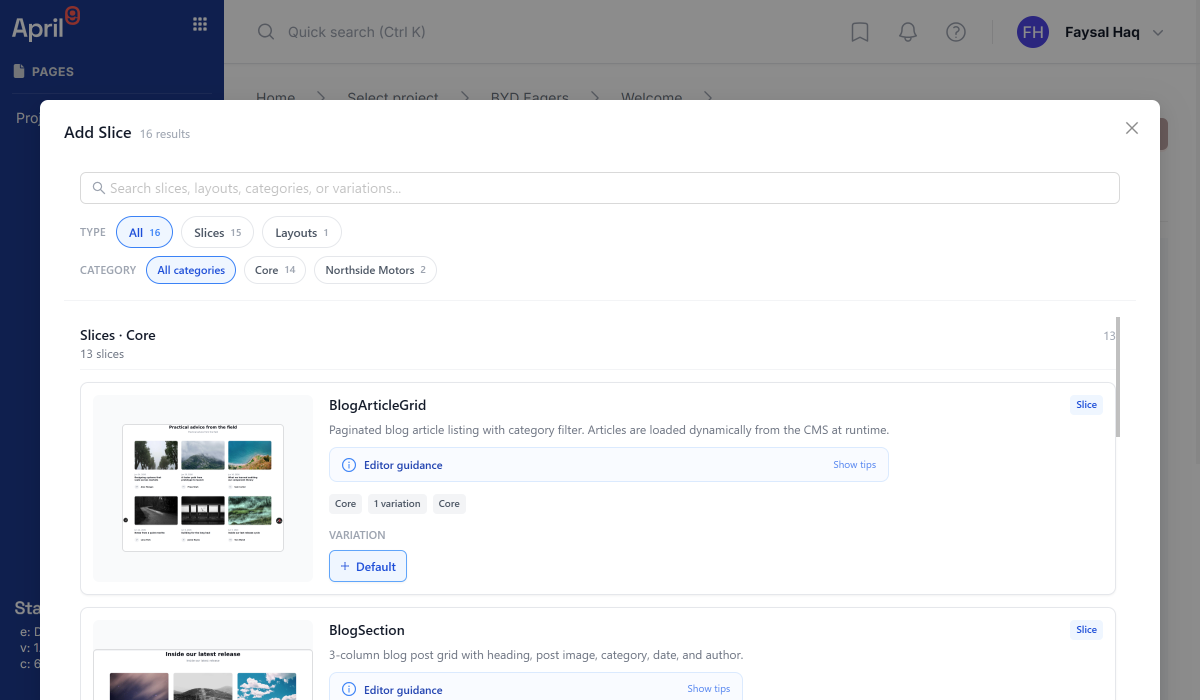
The trade-off is explicit and worth communicating: a Fork buys local divergence and gives up upstream improvements. Prefer widening a Core definition's inputs over forking it.
Troubleshooting
A user sees no data at all after being granted a Business Unit
Enforcement fails closed, so an empty result is the symptom of both "correctly no access" and "authority could not be determined". Confirm the grant appears in GET /client/v1/business-units for that user. If the response is missing or errors, you are looking at an upstream or configuration failure, not a permissions decision.
A user cannot see legacy data they could see before
Their Default Business Unit grant was removed. Pre-existing, unscoped resources are Default-owned; without that grant they are out of scope. Restore the grant.
The switcher does not appear
The tenant has only its Default Business Unit, or the user has reach into only one unit. Both are correct behaviour.
Unsaved page edits vanished
Expected. Switching the Active Business Unit exits open editors and discards unsaved drafts by design, so an edit made in one unit can never be saved into another. Save before switching.
A campaign or form was created in the wrong Business Unit
Ownership is immutable, so it cannot be reassigned. Recreate it in the correct unit — or duplicate it, for resources that support duplication — and delete the original.
A Tenant Owner cannot administer memberships
Correct. Tenant Owner is a data-reach scope, not an administrative role. Membership and Business Unit lifecycle changes are operator-side.
A page project will not duplicate into another Business Unit
The preflight found private Documents Manager references owned by the source unit. Move those assets to Shared, or replace them in the target, then retry.
Next steps
- Business Units — the full conceptual model and scoping rules
- How to manage files with Documents Manager — libraries, Shared Asset Library, and cross-library copies
- How to preview Pages — previewing content inside the Active Business Unit
- Platform Architecture — where the tenant boundary sits