Content Management
Stack9 Experience Content Management provides headless CMS capabilities, email template systems, and form builders that enable omnichannel content delivery and lead capture. Built with a project-based architecture, it supports multi-brand content management with reusable components and advanced personalization.
What is Content Management?
Content Management in Stack9 Experience goes beyond traditional CMS by providing three integrated systems:
- ✅ Pages (Headless CMS) - Multi-project content architecture with document models and a governed Slice library
- ✅ Templates & Email Design - Versioned email templates with snippet reusability
- ✅ Forms & Lead Capture - Visual form builder with direct subscriber integration
Unlike monolithic CMS platforms, Stack9's headless approach decouples content creation from presentation, enabling the same content to power websites, mobile apps, emails, and any other channel through REST APIs.
Pages has since grown from a content API into a visual authoring product. Alongside the content plumbing it now provides live preview through the real renderer, a faceted, governed Slice library, a responsive image pipeline with per-breakpoint art direction, URL redirect management, per-project site settings, and project duplication and template sync for multi-brand rollouts. Each is covered below.
Pages (Headless CMS)
Project-based Content Architecture
Stack9 organizes content into projects, each representing a website, brand, or content domain. This enables organizations to manage multiple properties from a single platform while maintaining complete separation.
Key Concepts:
- Projects - Top-level containers for related content (e.g., "Corporate Website", "Product Docs")
- Document Models - Define the structure and schema for different types of content
- Slice Models - Reusable content components that can be combined to build rich pages
- Documents - Individual pieces of content based on document models
Document and Slice Models
Document Models act as content templates that define:
- Available fields and their types
- Required vs optional content
- Validation rules and constraints
- Content structure for different page types
Slice Models define the reusable components editors compose pages from — hero sections, rich content blocks, calls to action, galleries, and media sections.
This component-based approach enables content creators to build rich, consistent pages by combining pre-defined components, while developers maintain control over what those components can do.
The composition vocabulary
Stack9 uses precise terms for the pieces of a page. They are worth learning, because governance rules attach to each one.
| Term | What it is |
|---|---|
| Slice | A composable content component placed on a page. The unit an editor adds, orders, and configures. |
| Layout | A Slice that arranges other components, exposing one or more columns. |
| Wrapper | The per-instance presentation shell around a Slice — tone, spacing, and width — expressed through approved theme tokens rather than raw styling. |
| Block | A component designed to be placed inside a Layout column. Each Layout column declares which Blocks it accepts. |
| Core Slice | The canonical, tenant-owned definition of a Slice or Block, consumed by every Business Unit through its declared content and theme inputs. |
| Business Unit Fork | A separately identified, Business Unit–owned definition derived from a Core Slice, for the cases where one brand genuinely needs structural change. It never overrides or intercepts updates to the Core Slice. |
Pages are composed top-down as page → section → block, so a Layout can hold Blocks while remaining one addressable Slice in the document. Core Slices and Business Unit Forks are covered in detail in Business Units.
The governed Slice library
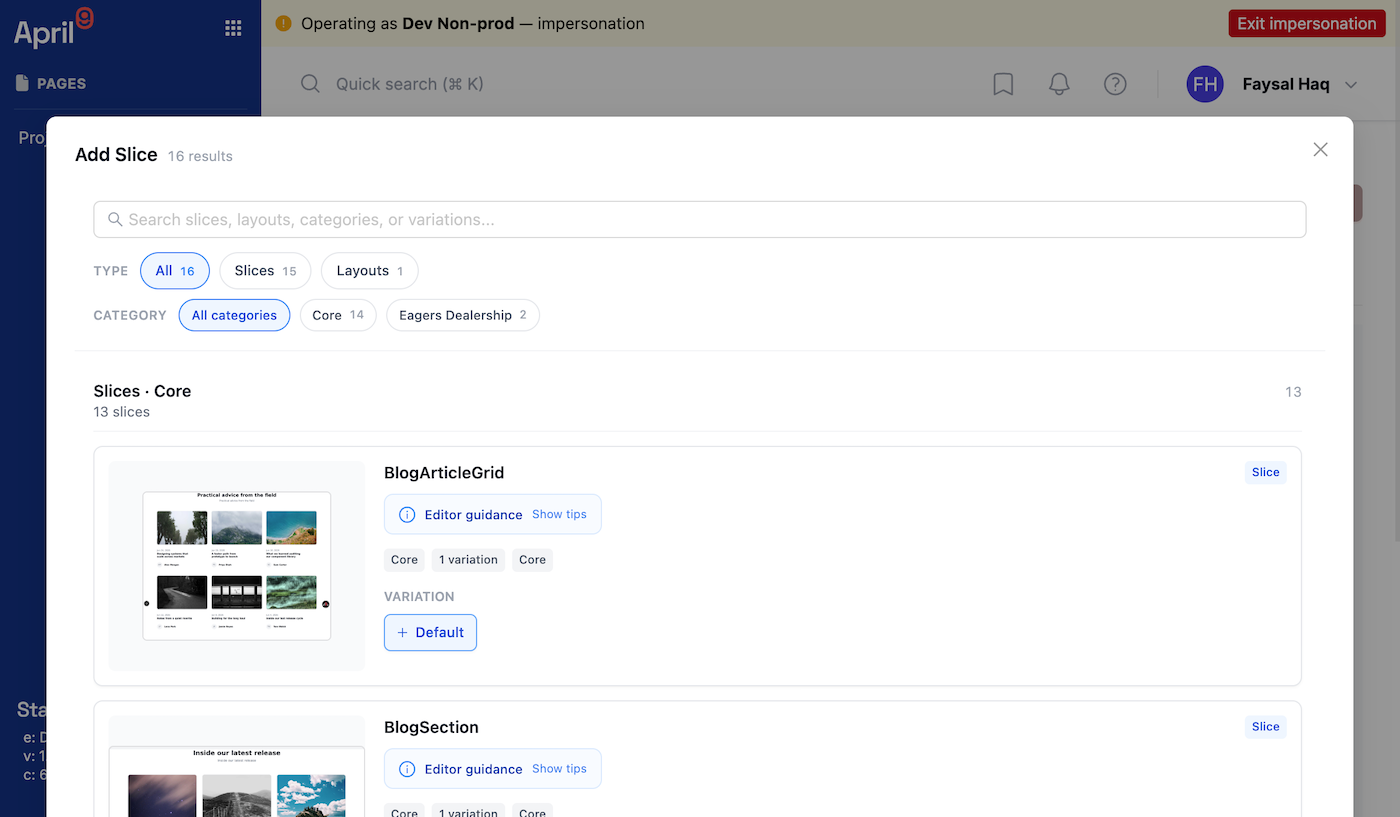
Component libraries fail in two directions: too few components and editors ask for a developer, too many and nobody can find the right one. Pages answers this by making Slice Models a searchable, faceted library with governance metadata on every entry.
Every Slice Model carries:
| Facet | Values | What it is for |
|---|---|---|
| Kind | section, layout, block | Separates page sections from Layouts and the Blocks that go inside them. |
| Origin | Core, Bespoke | Core is the tenant-owned Core Slice; Bespoke marks a Business Unit Fork. Editors can see at a glance whether they are using the governed component or a local variant. |
| Status | stable, beta, deprecated | Lets a team introduce components gradually and retire them visibly, instead of silently breaking pages. |
| Category and tags | Free-form | Group by purpose — hero, listing, form, testimonial — and filter by keyword. |
The picker returns facet counts alongside results, so filters show how many components sit behind each option rather than leading to an empty list. Each entry shows its variation screenshot — or, for Layouts, a generated schematic of the column widths — and each Layout column declares an allow list of the Blocks it accepts, so an editor cannot place a component where it was never designed to work. Per-Slice authoring hints appear beside the component as editorial guidance.
Building Slices: the Slice Devkit
Developers extend the library along a paved road rather than by writing free-form markup. The Slice Devkit is the typed authoring API for building Slices from approved primitives — Root, Wrapper, Layout, Column, Block, Heading, Text, Actions, Button, and Image.
Three contracts define what a well-built Slice looks like:
- The Slice Rendering Contract — the runtime contract for rendering Slices, Layouts, and Blocks. The consumer web application implements the renderer; the CMS is a client of it, not the canonical renderer.
- The Slice Token Contract — colour, spacing, typography, radius, and shadow may only be expressed through approved theme tokens, never as arbitrary values. This is what makes a new component on-brand by construction and what allows a tenant to restyle its whole site by changing tokens.
- The Structural Tailwind Allowlist — a narrow set of utilities for layout mechanics only: positioning, display, visibility, stacking, and responsive composition. It exists so structural CSS cannot smuggle in presentation that the theme is supposed to control.
A Slice Model also declares metadata the CMS honours: which Blocks each Layout column accepts, which Wrapper controls an editor may adjust, whether the component hard-codes a light or dark tone, its editorial guidance text, and the Image Variants its image fields expect.
Because Wrapper values are token keys rather than raw CSS, per-instance styling stays inside the design system: an editor choosing a tone or width picks from the theme, and a theme change propagates to every instance.
The Devkit primitives and the Slice tree renderer live in the consumer web application layer, not in the CMS packages. If you are starting a Slice development project, confirm the exact package and version to build against with your Stack9 delivery team.
Live preview
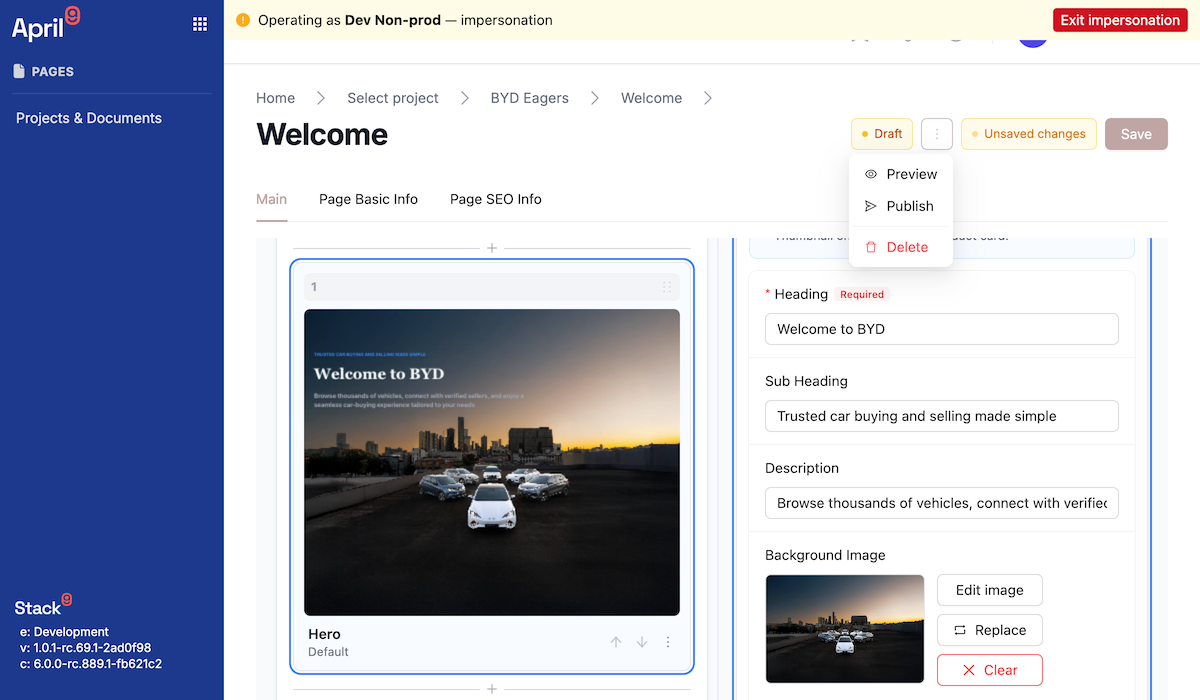
The oldest complaint about headless CMS authoring is that the editor shows an approximation and the site shows the truth. Pages closes that gap by rendering each Slice through the real renderer: the editor loads your own web application's preview route in an iframe and posts the current content into it.
What editors get:
- Live thumbnails in the Slice sidebar — a static screenshot while out of view, swapped for a live render once the renderer is warm, and reverted to the screenshot if it does not respond.
- A composed page canvas rendering the whole document in one renderer instance rather than one iframe per component.
- Preview that tracks unsaved edits, debounced as you type, with generous undo and redo over both field values and Slice composition.
- Point-and-edit from the preview: selecting an element in the rendered page focuses the field behind it.
- Graceful degradation — the editor probes whether the preview domain is reachable and falls back to component screenshots when it is not, so authoring never blocks on a preview outage.
Shareable snapshots. To send a page to a reviewer, an editor uses Preview page: the current editor state — including unsaved edits — is persisted, and the platform returns a token. Opening the tokenised preview URL renders that exact state through the real renderer, so a stakeholder reviews the page without a Stack9 login and without publishing anything.
A preview snapshot URL renders unpublished content to whoever holds the token. Share links deliberately, and treat them as you would any unlisted URL: they are convenient for review, not an access-control mechanism.
Setup is one step: an implementer sets the project's preview domain, which is stored on the project and used for both the in-editor preview and the snapshot links.
Images: Image Variants and Breakpoints
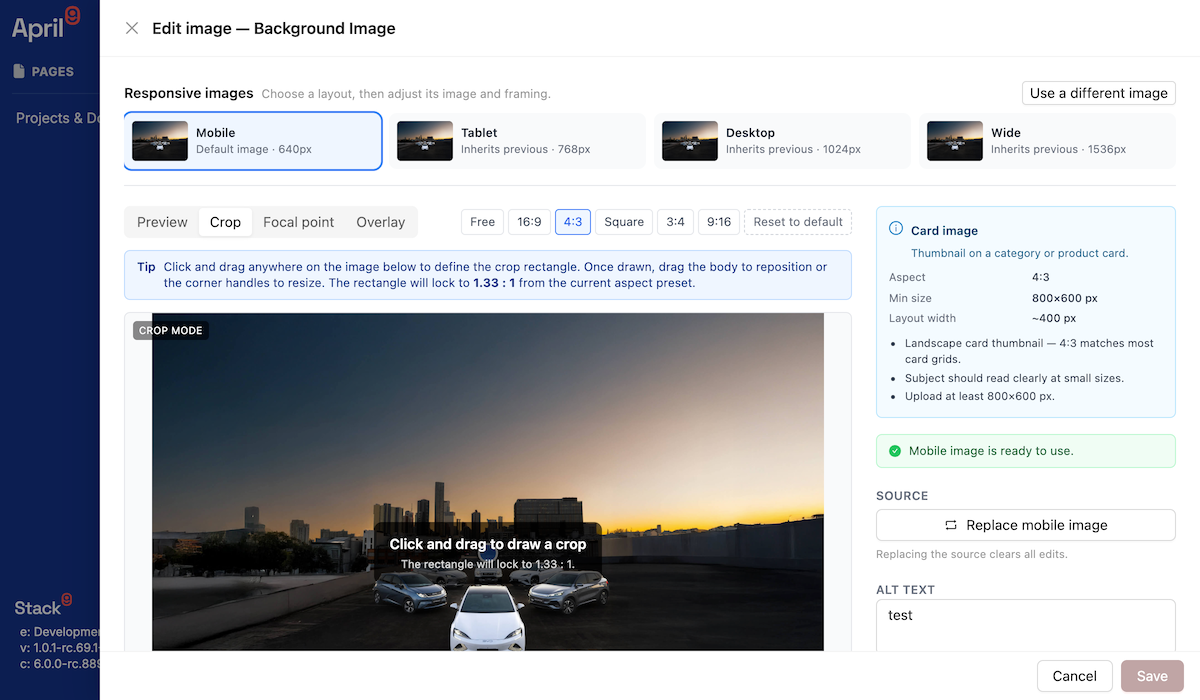
Pages treats an image as one source asset plus editorial intent, not as a set of manually resized files. The source lives in the Documents Manager; Pages layers rendering intent on top.
| Term | What it is |
|---|---|
| Original Asset URL | The asset's own URL. Used for downloads, fonts, ZIP exports, and copy-link — never for optimised rendering. |
| Transformed Image URL | A delivery URL that applies resize, crop, quality, and format to the Original Asset URL. Rendering only. |
| Image Variant | A named rendering intent for one source image — mobile hero, desktop hero, card thumbnail, social image — carrying aspect, crop, focal point, and zoom. |
| Image Breakpoint | A responsive rendering target. Editors see Mobile, Tablet, Desktop, and Wide; configuration and rendering use stable keys underneath. |
| File Revision | The planned source-byte version used to bust caches when bytes are replaced. See the roadmap note below. |
Crop and focal data are stored as normalised fractions, not pixels. That single decision means replacing a source image with a higher-resolution version keeps every crop framed correctly instead of silently shifting it.
In the image editor an author can:
- Give each breakpoint its own source image for true art direction — a tight portrait crop on mobile, a wide landscape on desktop — or let a breakpoint inherit the previous one.
- Switch between Preview, Crop, Focal point, and Overlay tools, with aspect presets, a zoom control that applies the same maths the renderer uses, "apply crop to all variants", and a reset.
- Add an overlay scrim with direction and opacity, so text stays legible over photography without a Photoshop round trip.
- Set alt text and a caption, with missing alt text raised as an error rather than a warning.
Guidance is built in. Image fields can declare a role — hero, mobile hero, full-width, split call to action, tile, card — each with an expected aspect ratio and minimum dimensions. The editor validates against the role and warns when a source is too small, when a variant would upscale, or when a crop is extreme. An auto-optimise recommendation proposes a modern format, a sensible quality, and capped output widths, and never upscales beyond the source.
On the render side, images are delivered as responsive sources with the appropriate srcset and sizes, cropping is achieved without a server round trip where possible, and legacy image values keep rendering unchanged — adopting variants is opt-in per image, not a migration.
The payoff is measurable. In a representative internal test, a 1080×1920 JPEG of roughly 440 KB delivered as an optimised mobile source dropped to about 128 KB, and as a cropped desktop hero to about 145 KB — reductions near 70% without an editor resizing anything.
Two parts of this pipeline are not production-final:
- Production URL signing for the transform service is on the hardening track; demonstration environments use unsigned URLs. Signing keys never reach the browser.
- File Revision cache-busting is specified but not shipped. Until it lands, replacing image bytes on a heavily cached asset needs explicit CDN invalidation.
Confirm what is live in your target release before you depend on transformed-URL behaviour, and do not build integrations against a file_revision field yet.
URL redirects
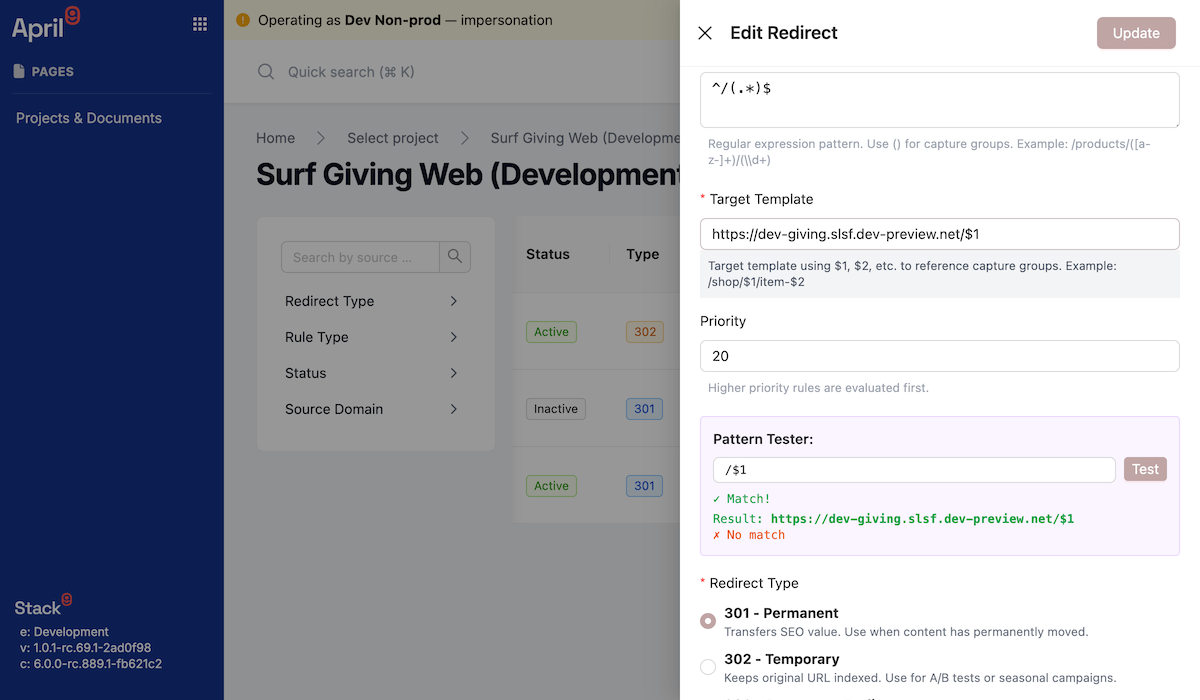
Sites get restructured, campaigns end, and URLs change. Pages manages redirects as first-class project content rather than as an infrastructure ticket:
- Three rule types —
staticfor an exact path,prefixfor wildcard rewrites of a whole branch, andregexwith capture groups for patterned migrations. - Standard status codes — 301, 302, and 308, chosen per rule.
- Priority and an active flag, so overlapping rules resolve predictably and a rule can be staged before it goes live.
- Live testing while authoring — a pattern preview for prefix rewrites and a tester for regular expressions, so a rule is validated before it is saved.
- Target validation that rejects unsafe schemes and requires either a relative path or an
http/httpsURL.
Crucially, there is a public lookup endpoint designed for edge or framework middleware: your site asks "is there a redirect for this domain and path?" and receives either a match with its status code, target, and whether the target is external, or a clear no-match. That keeps redirect management in the hands of marketers while the enforcement stays at the edge, where it belongs.
Site settings
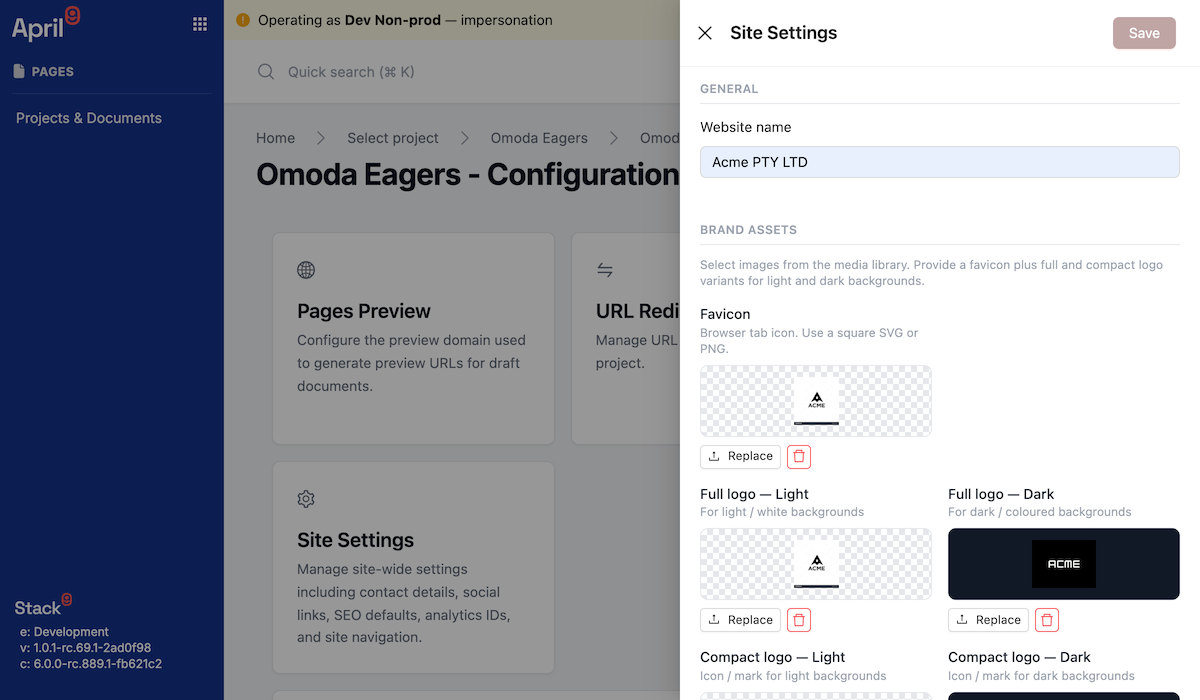
Every project carries a site settings record — a single, per-project home for the values a site shell needs:
- Brand assets — favicon plus full and compact logos in light and dark variants, each supporting the same focal and crop editing as content images.
- Typography — body and heading fonts sourced from system stacks, Google Fonts, or custom uploaded font files with weights and styles.
- Theme tokens — the persisted token set that the theme configurator produces, which is what the Slice Token Contract resolves against.
- Navigation — the components used as the site header and footer navigation.
- SEO defaults — default meta title and description, applied where a document does not override them.
- Analytics — measurement and container IDs, so tracking is configuration rather than a code change.
- Contact and social — phone, email, address, and social profile links for the site shell.
This is what makes a site launch a content task: the shell reads its brand, fonts, navigation, and analytics from settings instead of hard-coding them.
Project duplicate and template sync
Multi-brand rollouts need two operations that are easy to get wrong by hand.
Project duplicate clones an entire Pages project — its Slice Models, document models, screenshots, and documents — into a target Business Unit as a new, independently owned project. A preflight runs first and lists any private file references that would break in the target scope, with the document and field path for each, so you fix or replace them before copying rather than discovering broken images afterwards. Ownership in Stack9 is immutable, so duplication is how content legitimately crosses a Business Unit boundary.
Template sync applies to projects provisioned from a Pages Template. The project can re-pull the template's Slice Models, document models, and screenshots to pick up upstream improvements while remaining its own editable project. Version fields on the project record — the template it came from, the template's current version, the version last synced, and when — make the drift visible.
Project duplicate and template sync are available through the API but have no button in the Pages authoring interface; they are triggered by an administrator. If a self-service entry point matters to your rollout plan, raise it with your Stack9 delivery team rather than assuming an editor can run either operation.
Multi-channel Content Delivery
The headless architecture enables content delivery across any channel:
Content Creation (Headless) → API → Multiple Channels
                                   ├── Website
                                   ├── Mobile App
                                   ├── Email Templates
                                   └── Third-party Systems
Content created once can be consumed by web frontends, mobile applications, email campaigns, or integrated into other business systems via the REST API.
Assets and attachments
Assets used by Pages come from the Documents Manager, the tenant's central library, selected through the same pickers used across email and forms. Pages stores a reference plus its own editorial intent — Image Variants, focal point, crop, caption, and alt text — rather than a copy of the file.
Alongside the library, Pages uses presigned URLs for secure, time-limited file handling:
- Document attachments and downloads
- Component screenshots used by the Slice library and preview thumbnails
- Media files for rich content experiences
- Time-limited access to private content
API Reference: Pages is served by the /pages/* endpoints — project metadata, document models, documents, and the faceted /pages/{project_id}/slice-model list — plus /pages/{project_id}/site-settings, /pages/{project_id}/redirects including the public redirects/check lookup, the preview snapshot pair (.../preview-snapshot and /pages/preview/{token}), /pages/{project_id}/duplicate with its preflight, /pages/{project_id}/sync-with-template, and /pages/{project_id}/attachment/signed-url — see the Pages and Documents API for full schemas.
A Pages document has a status of draft, live, or archived, and its content is carried as an opaque JSON payload that the platform stores without reshaping. That opacity is deliberate: it is why additive authoring data such as image edits survives round trips through the API untouched.
Templates & Email Design
Template Versioning and A/B Testing
Stack9's template system supports multiple versions of each template, enabling:
- A/B testing - Compare different subject lines, designs, or content approaches
- Historical tracking - Maintain previous versions for audit and rollback
- Draft management - Work on new versions while keeping current versions live
- Performance optimization - Identify which template versions perform best
Snippet System for Modular Content
Template Snippets provide reusable components that can be shared across multiple email templates:
- Header and footer sections
- Product showcases and promotions
- Social media blocks
- Legal disclaimers and unsubscribe text
This modular approach ensures brand consistency across all email communications while reducing duplicate content management.
Personalization with Substitution Data
Templates support dynamic content through a substitution data system:
- Personalize with subscriber data (name, location, preferences)
- Include dynamic product recommendations
- Insert campaign-specific content
- Customize based on user behavior or segmentation
The template engine processes substitution data at send time, enabling highly personalized emails at scale.
Preview Capabilities
Real-time preview functionality allows marketers to:
- See exactly how emails will render across devices
- Test substitution data with sample content
- Validate template designs before sending
- Ensure brand compliance and quality control
API Reference: Template management uses /email_templates, /email_templates/versions, and /email_template_snippets endpoints with comprehensive versioning, preview, and content management capabilities.
Forms & Lead Capture
Visual Form Builder
Stack9 provides a SurveyJS-based form builder that enables marketers to create sophisticated forms without coding:
- Drag-and-drop field placement
- Multiple field types (text, email, phone, dropdown, etc.)
- Conditional logic and field dependencies
- Multi-page forms with progress indicators
- Custom validation rules
Theme System for Brand Consistency
Form Themes ensure visual consistency across all forms:
- Brand colors and typography
- Custom CSS styling options
- Responsive design templates
- Corporate identity compliance
Organizations can maintain multiple themes for different brands or use cases while ensuring a professional, consistent appearance.
Integration with Subscriber Management
Forms integrate directly with Stack9's Customer Data Platform:
- Automatic subscriber creation - Form submissions create new subscriber records
- Profile updates - Existing subscribers can update their information
- Preference management - Allow subscribers to manage communication preferences
- Journey triggers - Form submissions can start automated marketing journeys
Submission Tracking and Analytics
Comprehensive form analytics provide insights into:
- Submission rates and conversion metrics
- Field-level completion analysis
- Abandonment patterns and optimization opportunities
- Integration with campaign attribution
CORS Management and Security
Forms include security features for safe embedding:
- CORS (Cross-Origin Resource Sharing) controls
- Domain allowlists for embedding permissions
- Spam protection and validation
- Secure data transmission
API Reference: Forms capabilities are delivered through /forms, /form_themes, and /form_submissions endpoints with visual builder integration, submission tracking, and theme management.
Why Choose Stack9 Content Management?
Unified Platform Benefits
Traditional approach requires multiple solutions:
Headless CMS + Email Platform + Form Builder + Integration Layer
Stack9 Experience provides all capabilities in one platform:
Integrated Content Management with Shared Data & APIs
Speed to Market
- Pre-integrated systems - No complex integrations between CMS, email, and forms
- Shared subscriber data - Forms automatically feed customer database
- Unified analytics - Content performance across all channels
- Single API - One integration point for all content needs
Enterprise Scalability
- Multi-project architecture - Support multiple brands/websites
- Governed component library - Core Slices owned centrally, Business Unit Forks where divergence is genuinely needed
- Data segregation - Projects, assets, and forms scoped by Business Unit with server-side enforcement
- Advanced security - CORS controls and secure file handling
- Performance optimization - CDN-ready delivery with responsive, transformed images
- Audit capabilities - Complete version history and change tracking
Developer Experience
- RESTful APIs - Consistent, well-documented endpoints
- Flexible content models - Adapt to any content structure
- A paved road for components - The Slice Devkit plus the Slice Token and Rendering contracts
- Webhooks - Push form submissions to external systems in real time
- OpenAPI specification - Complete API documentation
Real-World Example
A multi-brand retailer uses Stack9 Content Management to:
- Manage multiple websites - Each brand has its own project with custom document models
- Create reusable components - Core Slices governed centrally, with a Business Unit Fork only where a brand needs structural change
- Review before publishing - Editors send tokenised preview snapshots to brand managers, rendered through the real site renderer
- Ship optimised imagery by default - One source asset, art-directed per breakpoint, delivered as responsive transformed images
- Capture leads consistently - Branded forms with automatic subscriber creation, pushed to the CRM by webhook
- Personalize email campaigns - Templates with brand-specific snippets and substitution data
- Deliver omnichannel experiences - Same content powers web, mobile, and email
Best Practices
- Design reusable Slice Models - Create components that work across multiple document types, and mark their status honestly as
betabeforestable - Keep Core Slices central - Fork to a Business Unit only when the structural difference is real, because a fork stops inheriting improvements
- Use projects strategically - Separate content by brand, domain, or Business Unit
- Stand up the preview domain early - Live preview and shareable snapshots are only as good as the renderer they point at
- Declare image roles on image fields - Role guidance and validation prevent undersized heroes far more reliably than review comments
- Manage redirects as content - Author them with the rest of the site change, and let the edge resolve them through the public lookup
- Implement consistent theming - Maintain brand guidelines through theme tokens, not per-instance styling
- Leverage template versioning - Use A/B testing to optimize email performance
- Plan for omnichannel - Structure content to work across web, mobile, and email channels
Next Steps
Ready to implement content management? Explore:
- Documents Manager - The central asset library behind Pages, email, and forms
- Business Units - Core Slices, Business Unit Forks, and content scoping
- Webhooks - Push form submissions to external systems in real time
- Marketing Automation - Use content in automated campaigns and journeys
- Customer Data Platform - Understand how forms feed subscriber management
- Email & Communications - Learn about email delivery and optimization
Stack9 Content Management provides the foundation for omnichannel digital experiences - a headless CMS with live preview and a governed component library, versioned email templates, and form capture, all accessible through unified REST APIs.