File Manager API
Overview
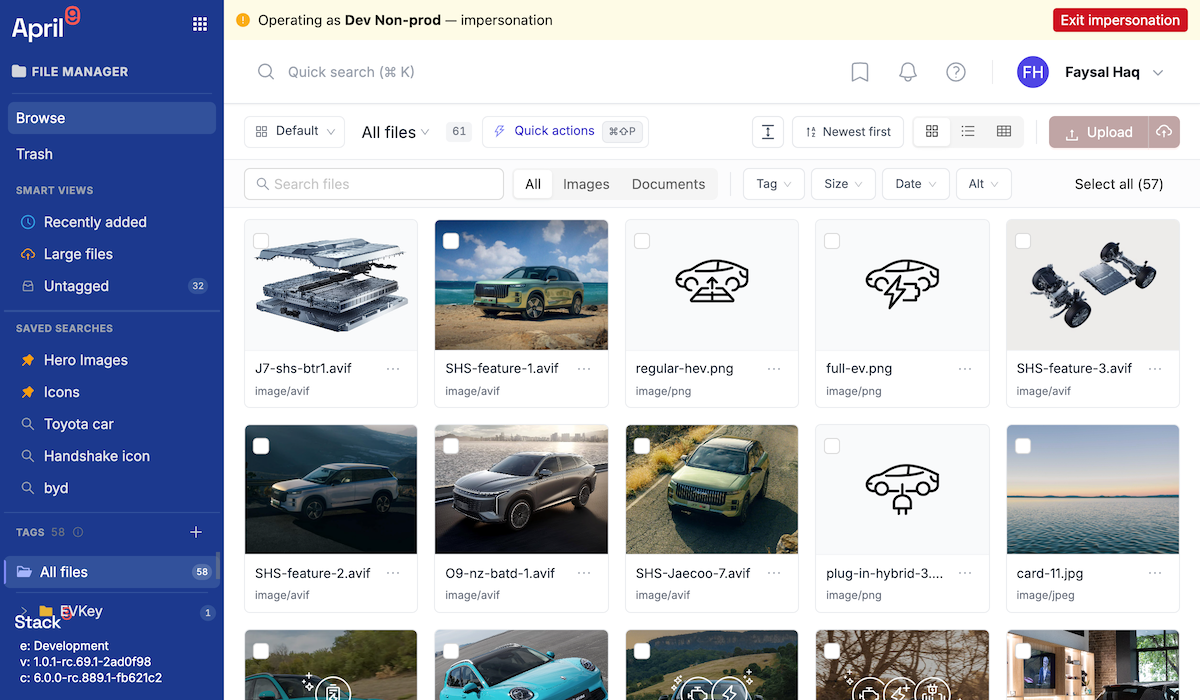
The Documents Manager (also called File Manager) is Stack9's centralized digital asset library: images, videos, and generic files that can be reused across Pages, Marketing, Emails, and any entity form. This page documents the broker REST API — the S3 object-lifecycle gateway behind the Documents Manager UI.
The broker is a thin S3 gateway: it signs upload/preview URLs and moves or deletes objects. It does not store file metadata (name, alt text, tags, dimensions) — that lives in Stack9 entities managed through the Documents Manager UI and the Stack9 named-query library, which is outside the scope of this public REST reference.
Every endpoint is scoped to the caller-authorized Business Unit — you cannot address objects outside your authorized scope.
Authentication
All endpoints require API key authentication:
X-API-Key: your-api-key-here
The signed-upload pattern
Files never transit the app server. The browser (or your integration) asks the broker to presign an S3 PUT URL, then uploads bytes directly to S3:
POST /api/file_manager/sign-put-url→ returns a short-livedsigned_url.PUTthe file bytes directly tosigned_urlwith the file'sContent-Type.- The object is now reachable at the returned
public_url.
Your bucket's CORS policy must allow PUT from your app origin, or step 2 will fail.
Presign an upload URL
POST /api/file_manager/sign-put-url
Request body
{
  "file_id": "photo-001",
  "original_name": "hero-banner.jpg",
  "mime": "image/jpeg"
}
| Field | Type | Notes |
|---|---|---|
file_id | string (1–128, ^[A-Za-z0-9._-]+$) | Required. Your identifier for the file. |
original_name | string | Required. |
mime | string | Required. |
Example response
{
  "file_key": "bu:sales/photo-001-hero-banner.jpg",
  "signed_url": "https://s3.amazonaws.com/...&X-Amz-Signature=...",
  "public_url": "https://cdn.example.com/bu:sales/photo-001-hero-banner.jpg",
  "expires_in": 900
}
Upload the bytes
curl -X PUT "$SIGNED_URL" \
  -H 'Content-Type: image/jpeg' \
  --data-binary '@/path/to/hero-banner.jpg'
Trash an object (soft delete)
POST /api/file_manager/trash-object
Moves the object under a private _trash/ prefix. The object is not publicly readable once trashed, but it is recoverable.
Request body
{ "file_key": "bu:sales/photo-001-hero-banner.jpg" }
Example response
{ "trashed_key": "_trash/bu:sales/photo-001-hero-banner.jpg" }
Restore an object
POST /api/file_manager/restore-object
Moves a trashed object back out of _trash/.
Request body
{ "trashed_key": "_trash/bu:sales/photo-001-hero-banner.jpg" }
Example response
{
  "file_key": "bu:sales/photo-001-hero-banner.jpg",
  "public_url": "https://cdn.example.com/bu:sales/photo-001-hero-banner.jpg"
}
Sign trash preview URLs
POST /api/file_manager/sign-trash-preview-urls
Trashed objects are private, so previewing them (before restoring or purging) requires short-lived signed GET URLs.
Request body
{ "trashed_keys": ["_trash/bu:sales/photo-001-hero-banner.jpg"] }
trashed_keys accepts 1–200 keys; each must start with _trash/.
Example response
{
  "previews": [
    { "file_key": "_trash/bu:sales/photo-001-hero-banner.jpg", "signed_url": "https://s3.amazonaws.com/...&X-Amz-Signature=..." }
  ],
  "expires_in": 240
}
Purge objects (hard delete)
POST /api/file_manager/purge-objects
Permanently deletes objects. There is no recovery after a successful purge — objects must already be trashed. Accepts 1–1000 keys per call.
Request body
{ "file_keys": ["_trash/bu:sales/photo-001-hero-banner.jpg"] }
Example response
{
  "deleted": ["_trash/bu:sales/photo-001-hero-banner.jpg"],
  "failed": []
}
A partially-failed purge returns the keys that did succeed in deleted, with { key, error } entries in failed for the rest — one refused item does not abort the whole batch.
Business Unit scoping
Every File Manager object carries an owning Business Unit. Reads return the union of: objects in your authorized Business Units, objects in the tenant-wide Shared library, and Default-owned objects (if Default is authorized for you). Ownership is immutable — there is no "move to another Business Unit" operation; to make a copy available elsewhere, upload it again in the target scope.
The Documents Manager UI offers a "copy to another library" action, but as of this writing there is no corresponding /file_manager/copy-object REST endpoint in the public API — the UI drives it through an internal named query. Do not build against a public copy-object endpoint until one is published here.
Roadmap
- File Revision — a numeric cache-busting version that increments on byte replacement, intended to feed CDN/transform URLs. Not present on file records today.
- imgproxy-backed image transforms (Transformed Image URLs, Image Variants, responsive breakpoints) — implemented as a demo/hardening-track feature in the image pipeline, not a generally available, production-signed capability yet. Treat "resize/crop on the fly" as not yet available through this public API.
- Video is stored and organized like any other file today; there is no inline player, transcoding, or poster-image generation.
Related
- Business Units API — how Business Unit scoping and Shared libraries work.
- Pages & Documents API — Pages images are picked from the same Documents Manager library.