How to receive form submission webhooks
Webhooks let an external system react the instant a website visitor submits a form — no polling the Form Submissions API. You register a target URL against one form, Stack9 POSTs the submission to it, and your system takes it from there.
What you'll build
A production-shaped receiver for a single form:
- An HTTPS endpoint that accepts a
form.submissiondelivery - A shared secret sent as an encrypted custom header, validated on your side
- A registered webhook, verified end-to-end with the built-in test endpoint
- Idempotent handling so queued retries and fan-out duplicates are harmless
Time to complete: 30-40 minutes
Prerequisites
- A form published in your Marketing Tenant, and its
form_code - A DXP API key (
X-API-Key) if you want to register the webhook over the API - Somewhere to host an HTTPS endpoint (a tunnel to localhost is fine while developing)
What ships today
Before you design anything, read this table carefully — the shipped surface is deliberately narrow.
| Capability | Status |
|---|---|
form.submission event | Shipped — the only event type |
Binding to one form via form_code | Shipped — required, and immutable after creation |
| Custom headers, with secret values encrypted at rest | Shipped |
| Test endpoint | Shipped |
| Queue-based async delivery with retries | Shipped |
Per-webhook last_attempt_at / last_attempt_status | Shipped |
| HMAC or any payload signature | Does not exist |
| One webhook covering all forms | Roadmap |
business_unit in the delivered payload | Roadmap |
| Per-submission delivery status and webhook history | Roadmap |
Stack9 does not sign webhook payloads. There is no X-Signature header, no shared signing secret, no timestamp or nonce header. Your receiver cannot cryptographically prove a request came from Stack9. Your entire authentication story is the secret custom header you configure — so treat that header like a password: HTTPS only, compared in constant time, rotated on a schedule, and paired with IP allow-listing if your infrastructure supports it.
Email event webhooks (delivery, bounce, open, click) are configured under Email Settings and come from the email provider. They use a different schema and a different mechanism. Likewise, the Stack9 Core automation webhook trigger is an endpoint the platform exposes to you — the opposite direction. This guide is only about outbound form submission webhooks.
Step 1: Find the form's form_code
Every webhook is bound to exactly one form, identified by its form_code (5-40 characters, letters, digits, _ and -). Open the form in the back office and copy the code, or list your forms over the API:
curl -X GET 'https://apis.app.stack9.co/api/forms' \
  -H 'X-API-Key: your-api-key-here'
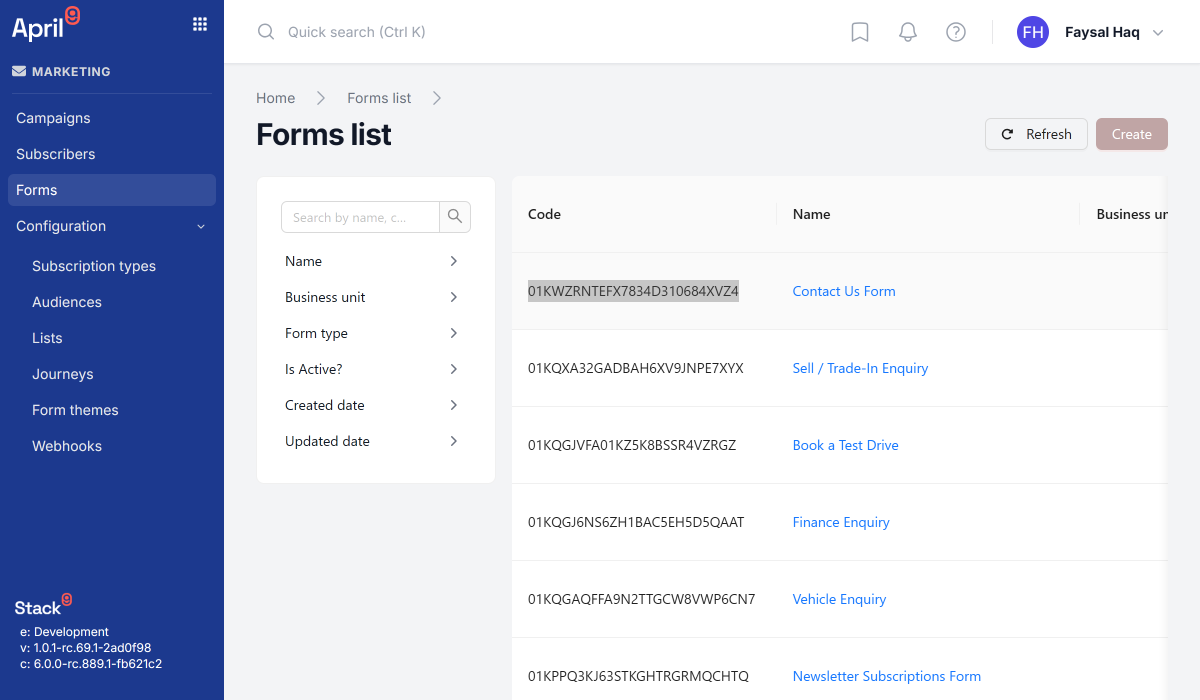
You cannot change form_code later — the event object is immutable after creation. One webhook per form, per destination; register a second webhook if you need a second form.
Step 2: Build the receiver
Write the receiver before you register the webhook, so your first delivery test is meaningful. The contract is simple: read the JSON body, validate the secret header, respond 2xx quickly.
// server.js — Express receiver for Stack9 form submission webhooks
const crypto = require('crypto');
const express = require('express');

const app = express();
app.use(express.json({ limit: '1mb' }));

const EXPECTED_SECRET = process.env.STACK9_WEBHOOK_SECRET;

// Constant-time comparison: a plain === leaks timing information.
function isValidSecret(received) {
  if (typeof received !== 'string' || !EXPECTED_SECRET) return false;
  const a = Buffer.from(received);
  const b = Buffer.from(EXPECTED_SECRET);
  if (a.length !== b.length) return false;
  return crypto.timingSafeEqual(a, b);
}

app.post('/hooks/stack9-forms', async (req, res) => {
  // 1. Authenticate. This is the ONLY authentication available — no signature exists.
  if (!isValidSecret(req.get('X-Api-Key'))) {
    return res.status(401).json({ error: 'unauthorized' });
  }

  const submission = req.body?.data;
  if (!submission?.id) {
    return res.status(400).json({ error: 'malformed payload' });
  }

  // 2. Acknowledge fast, then process. Slow receivers get retried.
  res.status(200).json({ received: true });

  // 3. Be idempotent — retries and fan-out can deliver the same submission twice.
  try {
    await handleSubmissionOnce(submission);
  } catch (err) {
    console.error('submission processing failed', submission.id, err);
  }
});

async function handleSubmissionOnce(submission) {
  const alreadySeen = await store.exists(`stack9:submission:${submission.id}`);
  if (alreadySeen) return;

  await crm.createLead({
    email: submission.email_address,
    formCode: submission.form_code,
    answers: submission.form_data,
    submittedAt: submission.submission_date,
  });

  await store.put(`stack9:submission:${submission.id}`, { processedAt: new Date() });
}

app.listen(3000);
Three rules that matter:
- Compare the secret in constant time.
timingSafeEqualon equal-length buffers, with an explicit length check first. - Respond before you process. Acknowledge with
2xxas soon as the payload is validated, then do the slow work. A receiver that blocks on a CRM call invites retries and duplicate work. - De-duplicate on
data.id. Retries (up to 5) and multiple webhooks pointing at the same URL both produce repeat deliveries. This is expected behaviour, not a bug to report.
The payload you will receive
The body is an envelope with the whole Form Submission under data:
{
  "data": {
    "version": 1,
    "created_at": "2026-01-01T00:00:00.123Z",
    "updated_at": null,
    "id": "1f0d9a52-7c31-4a7e-9c88-0b1e5a7e93d1",
    "form_code": "contact",
    "email_address": "visitor@example.com",
    "submission_date": "2026-01-01T00:00:00.000Z",
    "form_data": {
      "first_name": "Jane",
      "enquiry_type": "Service booking",
      "message": "Please call me back tomorrow morning."
    },
    "events": [
      {
        "type": "created",
        "message": "Submission received",
        "isError": false,
        "timestamp": "2026-01-01T00:00:00.100Z"
      }
    ]
  }
}
form_data is free-form: its keys are the questions on your form, so it changes whenever an editor changes the form. Read defensively rather than destructuring required fields.
business_unit is not in the payload yetCarrying the originating Business Unit in every delivery is specified but not shipped. If you need to route by brand or dealership today, register one webhook per form and infer the scope from form_code. Do not build against a business_unit field — it does not exist.
Step 3: Register the webhook
Option A: the back office
Open the Webhooks screen and create a new webhook. You will set a Name, the Event (form.submission) and its Form, the Target URL, and any Custom headers.
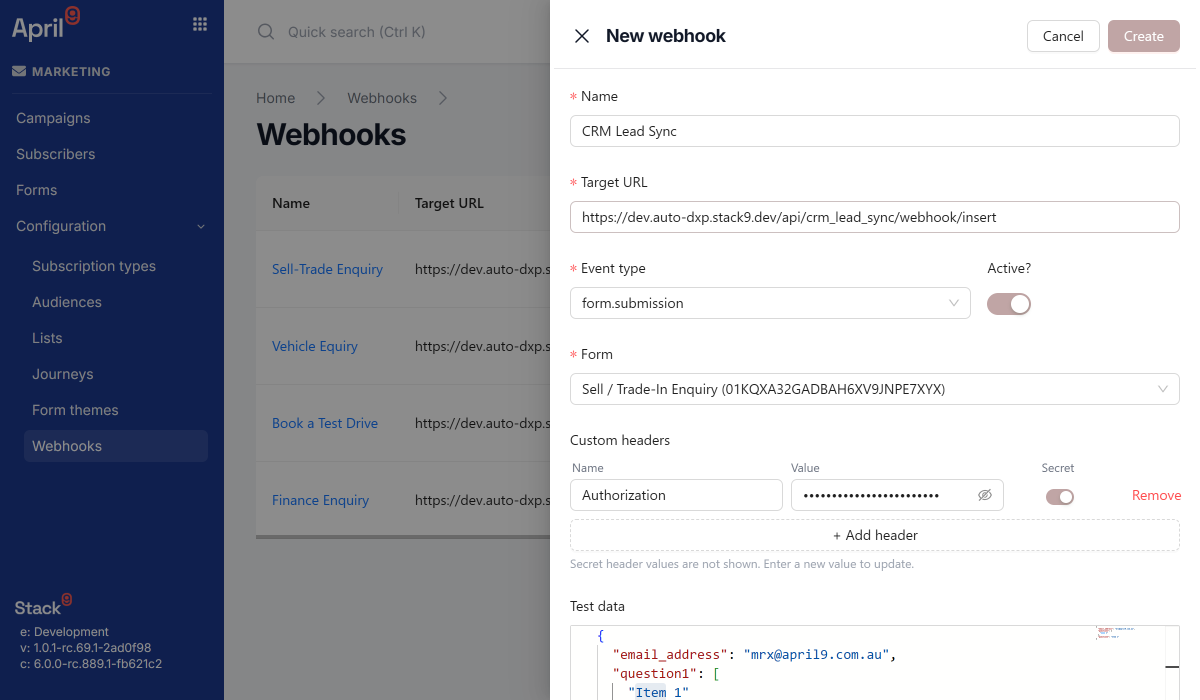
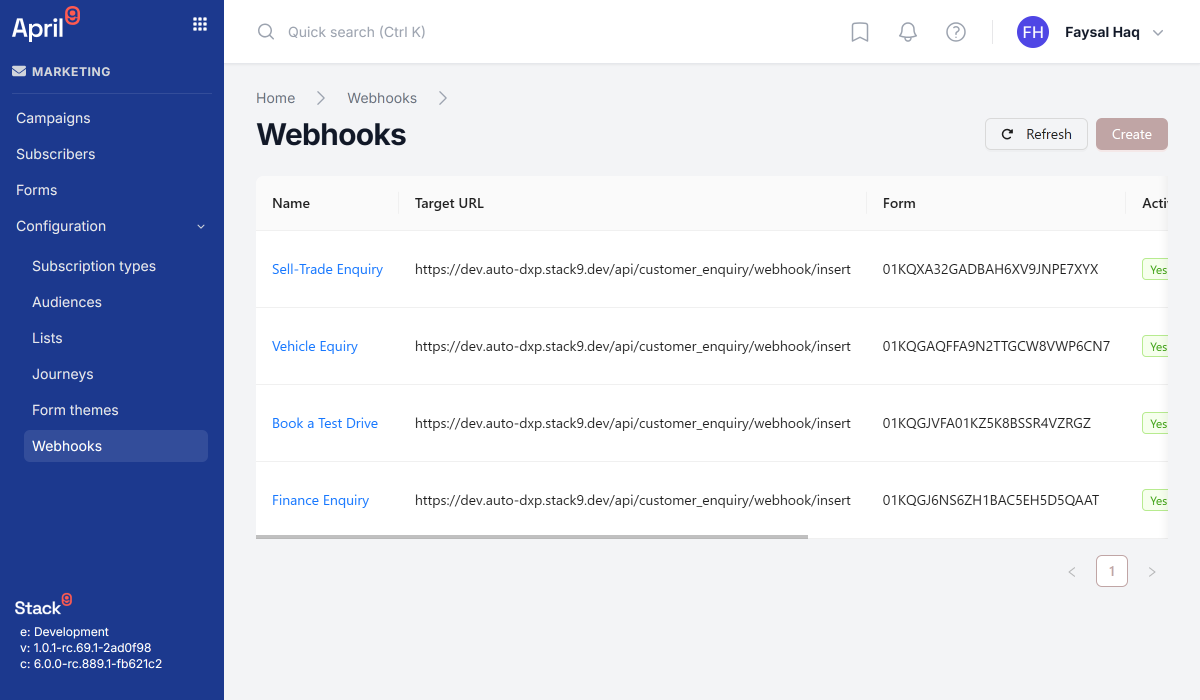
Note that the event and form selects are disabled when editing an existing webhook — that pair is immutable.
Option B: the API
curl -X POST 'https://apis.app.stack9.co/api/webhooks' \
  -H 'X-API-Key: your-api-key-here' \
  -H 'Content-Type: application/json' \
  -d '{
    "name": "CRM lead capture",
    "event": {
      "event_type": "form.submission",
      "form_code": "contact"
    },
    "target": {
      "url": "https://crm.example.com/hooks/stack9-forms",
      "headers": [
        { "name": "X-Api-Key", "value": "a-long-random-secret", "is_secret": true }
      ]
    },
    "active": true,
    "test_data": {
      "email_address": "example@april9.com.au",
      "first_name": "Jane",
      "enquiry_type": "Service booking"
    }
  }'
Response:
{ "id": "7c9f0f0a-3b1a-4a01-8a2f-2b0f9d5e6c31" }
Field reference:
| Field | Required | Notes |
|---|---|---|
name | yes | 1-200 characters. Human label. |
event.event_type | yes | Always form.submission. |
event.form_code | yes | The form to listen to. Immutable. |
target.url | yes | http or https. Use https in production. |
target.headers[] | no | Each is name, value, is_secret. Defaults to an empty list. |
active | no | Defaults to true. Inactive webhooks do not deliver. |
test_data | no | Free-form JSON body used by the test endpoint. |
Step 4: Secure it with a secret header
is_secret: true changes how the value is handled:
- It is encrypted at rest.
- It is omitted from every API response. Reads return
{ "name": "X-Api-Key", "is_secret": true }with novalue. Non-secret headers do return theirvalue. - On update,
valueis optional: omit it to keep the current secret, provide it to rotate.
Generate a high-entropy value — this is the only thing standing between your endpoint and the public internet:
openssl rand -base64 48
Rotating the secret later is a plain update. Deploy your receiver so it accepts both the old and new value, rotate, then drop the old one:
curl -X PUT 'https://apis.app.stack9.co/api/webhooks/7c9f0f0a-3b1a-4a01-8a2f-2b0f9d5e6c31' \
  -H 'X-API-Key: your-api-key-here' \
  -H 'Content-Type: application/json' \
  -d '{
    "name": "CRM lead capture",
    "active": true,
    "target": {
      "url": "https://crm.example.com/hooks/stack9-forms",
      "headers": [
        { "name": "X-Api-Key", "value": "the-new-rotated-secret", "is_secret": true }
      ]
    }
  }'
Note there is no event in the update body — it cannot be changed.
Layer whatever else your stack allows: terminate on HTTPS only, allow-list Stack9's egress addresses at your edge if you can obtain them, reject bodies over a sane size, never log the secret header, and never treat webhook input as trusted — validate and sanitise form_data exactly as you would a public form post. Reads of form_data keys should never be interpolated into SQL, shell commands, or HTML without escaping.
Step 5: Test the delivery
The test endpoint sends the webhook's stored test_data to the configured target URL, with the configured headers, and reports exactly what happened — no form submission required:
curl -X POST 'https://apis.app.stack9.co/api/webhooks/7c9f0f0a-3b1a-4a01-8a2f-2b0f9d5e6c31/test' \
  -H 'X-API-Key: your-api-key-here'
{
  "success": true,
  "status_code": 200,
  "response_body": "{\"received\":true}",
  "duration_ms": 187
}
| Field | Type | Notes |
|---|---|---|
success | boolean | Always present |
status_code | number | The HTTP status your receiver returned |
response_body | string | Your response body, captured verbatim |
duration_ms | number | Round-trip time |
error | string | Present when the call could not complete at all |
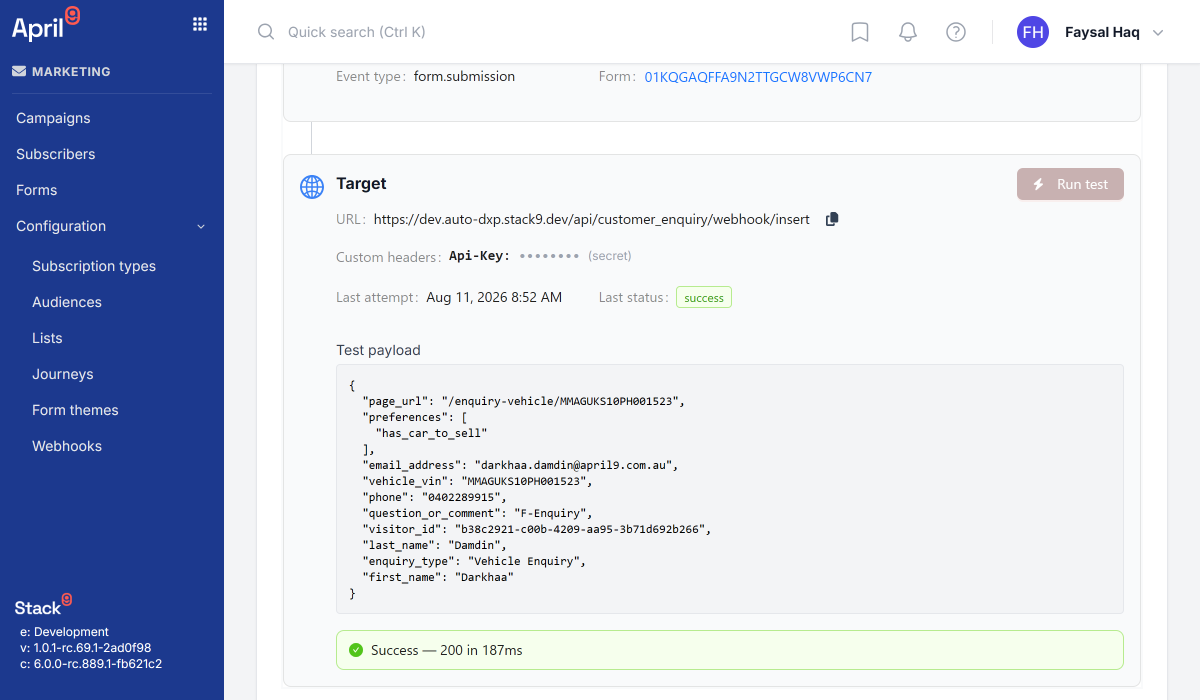
Work through the failure modes deliberately — it is much cheaper here than in production:
| What you see | Usual cause |
|---|---|
success: false with error and no status_code | DNS, TLS, or connection failure. The receiver was never reached. |
status_code: 401 | Your validation rejected the secret. Check the header name matches exactly, including case-insensitive lookup on your side. |
status_code: 404 | Path typo in target.url. |
status_code: 500 | Your handler threw. Check response_body for your own error text. |
test_data is sent as you stored it. A real delivery wraps the submission in { "data": { ... } }. Set test_data to a realistic envelope if you want the test to exercise your parsing path as well as your authentication path.
Step 6: Submit a real form
Submit the live form and confirm the delivery lands. Then check the webhook record:
curl -X GET 'https://apis.app.stack9.co/api/webhooks?form_code=contact' \
  -H 'X-API-Key: your-api-key-here'
{
  "results": [
    {
      "version": 1,
      "created_at": "2026-01-01T00:00:00.000Z",
      "id": "7c9f0f0a-3b1a-4a01-8a2f-2b0f9d5e6c31",
      "name": "CRM lead capture",
      "event": { "event_type": "form.submission", "form_code": "contact" },
      "active": true,
      "last_attempt_at": "2026-01-01T09:15:03.412Z",
      "last_attempt_status": "success",
      "target": {
        "url": "https://crm.example.com/hooks/stack9-forms",
        "headers": [{ "name": "X-Api-Key", "is_secret": true }]
      }
    }
  ]
}
last_attempt_at and last_attempt_status (success or failed) reflect the most recent attempt only — they are per-webhook, not per-submission, and they are not a history. Your own receiver logs remain your source of truth for what was processed.
Step 7: Handle retries and fan-out
Delivery is queued and asynchronous, not inline with the visitor's form submission:
visitor submits form
        │
        ▼
FormSubmissionCreated ──► fan out to every active webhook on that form_code
                                │
                                ├─► DeliverWebhook  (webhook A, retry_count 0..5)
                                └─► DeliverWebhook  (webhook B, retry_count 0..5)
What this means for your receiver:
- Deliveries are not ordered and not instant. Do not rely on arrival order or on a submission reaching you before the visitor sees the thank-you page.
- Up to 5 retries per delivery. The backoff schedule and exactly which failures are retried are not part of the published contract, so assume a failure will be retried and make sure a partially processed submission is safe to reprocess.
- Fan-out is unrestricted. Multiple webhooks may target the same URL; each is its own delivery. Combined with retries, duplicate deliveries are normal — which is why Step 2 keys on
data.id. - Return
2xxfor anything you have accepted, even if downstream processing will happen later. Returning5xxbecause your CRM is briefly down is a valid choice only if you actually want the retry.
To stop deliveries without losing the configuration, set active: false:
curl -X PUT 'https://apis.app.stack9.co/api/webhooks/7c9f0f0a-3b1a-4a01-8a2f-2b0f9d5e6c31' \
  -H 'X-API-Key: your-api-key-here' \
  -H 'Content-Type: application/json' \
  -d '{
    "active": false,
    "target": { "url": "https://crm.example.com/hooks/stack9-forms" }
  }'
Delete permanently with DELETE /webhooks/{id}.
Troubleshooting
Nothing arrives after a real submission
Check, in order: the webhook is active; its form_code matches the form the visitor actually submitted; last_attempt_at is being updated at all (if not, the delivery never ran); the test endpoint still succeeds against the same URL. If the test succeeds but real submissions do not arrive, the submission is not landing on the form you think it is — confirm with GET /form_submissions?form_code=....
Every delivery is failed but the test succeeds
Your receiver is probably rejecting the real envelope while accepting the flat test_data shape. Real payloads nest everything under data. Log the raw body once (with the secret header redacted) and compare.
The same lead is created several times
You are missing idempotency, or more than one webhook points at the same URL. De-duplicate on data.id, and list your webhooks for that form_code to check for accidental duplicates.
The secret header stopped matching after an update
You included the header in the update body without a value, intending to rotate it — omitting value keeps the existing secret, while supplying a new one replaces it. Also confirm you did not drop the header from the array entirely: target.headers is replaced wholesale, so any header you omit is removed.
You need a signature, not a shared secret
Not available. Escalate it as a requirement rather than trying to synthesise one — you cannot derive a signature from the current payload, because no key material is shared with the receiver.
Next steps
- Forms API — form configuration, schema, and submissions
- Business Units — how forms and submissions are scoped inside a Marketing Tenant
- Email Settings — the separate email event webhooks for delivery, bounce, open, and click