Pages & Documents API
Overview
Stack9 Pages is a headless CMS organized around a Project (a brand or site). Within a project:
- Project Metadata — the project's own settings: whether it's a Pages Template, which template it was provisioned from, its owning Business Unit, redirect/preview configuration.
- Document Models — content type definitions (e.g. "Page", "Article") that documents are structured from.
- Slice Models — reusable content components ("Sections," "Layouts," and "Blocks") that document content can be composed from.
- Documents — the actual content instances created from a document model.
- Site Settings — a per-project singleton for branding, typography, navigation, social, analytics, and SEO defaults.
- Redirects — URL redirect rules for the project's domains.
Project
├── Project Metadata (settings, template provenance, Business Unit)
├── Site Settings (singleton: branding, typography, nav, SEO)
├── Redirects (URL rules)
├── Document Models (content types)
├── Slice Models (reusable components: Sections / Layouts / Blocks)
└── Documents (content instances)
If you've used an older version of this page, note three corrections:
- A document's
statusisdraft|live|archived— notdraft/published. - A document's
datafield is an opaque, already-JSON-stringified string — not a nested object. Stack9 does not reshape it; you own the shape you write and read back. - Document Models and Slice Models describe their fields as a Prismic-style field-definition map (an object keyed by field name, each value a
{ type, config }union) — not a flatfields[]array.
Pages projects and their resources are scoped to a Business Unit; see that page for how cross-Business-Unit sharing works.
Authentication
All endpoints require API key authentication via the X-API-Key header:
X-API-Key: your-api-key-here
Project Metadata
List project metadata
GET /api/pages/project_metadata/list
Query parameters
| Parameter | Type | Required | Description |
|---|---|---|---|
name | string | No | Filter by project name. |
search | string | No | Search projects by keyword. |
Example response
[
  {
    "version": 3,
    "created_at": "2026-01-15T10:00:00.123Z",
    "updated_at": "2026-02-20T14:30:00.456Z",
    "id": "corporate-site",
    "name": "corporate-site",
    "description": "Main corporate website content",
    "is_template": false,
    "template_id": "tmpl_corporate_base",
    "synced_template_version": 4,
    "template_synced_at": "2026-02-01T09:00:00.000Z",
    "business_unit_id": "bu_sales_east",
    "redirect_config": { "source_domains": ["www.example.com"] },
    "preview_config": { "domain": "https://preview.example.com" }
  }
]
The response is a plain array — there is no pagination wrapper on this endpoint. template_version only appears on the source template project itself (bumped on each template deploy); synced_template_version appears on a project provisioned from a template, once it has synced at least once. A missing business_unit_id means the project is Default-owned.
Create or update project metadata
PUT /api/pages/project_metadata/{id}
Request body
{
  "name": "ecommerce-site",
  "description": "Product catalog and content for e-commerce site",
  "is_template": false,
  "business_unit_id": "bu_sales_east",
  "preview_config": { "domain": "https://preview.example.com" }
}
name and description are required; every other field is optional. template_id, duplicated_from, and business_unit_id are set once at project creation and are treated as immutable provenance afterward — see Project Duplication & Template Sync.
Example response
{ "id": "ecommerce-site" }
Delete project metadata
DELETE /api/pages/project_metadata/{id}
Document Models
A document model defines the structure documents of that type are created from.
| Field | Type | Notes |
|---|---|---|
id | string | Unique within the project. |
label | string | Display name. |
format | "page" | "custom" | |
repeatable | boolean | Whether more than one document can be created from this model. |
status | boolean | Whether the model is active (true) or disabled (false). |
metadata.linkable | boolean | Whether documents of this model can be chosen as an internal link target. Absent means true. Set false for structural types (e.g. footer navigation) that aren't real linkable pages. |
json | object | The field-definition map (see below). Omitted from list responses; present on get-by-id. |
Field-definition map shape
json is an object keyed by group name (commonly Main), whose value is an object keyed by field name. Each field value is a discriminated union on type (Text, StructuredText, Image, Link, Select, Boolean, Group, Slices, UID, Color, Date, Number, and others), with a config object holding that field type's options:
{
  "Main": {
    "title": {
      "type": "Text",
      "config": { "label": "Page Title", "placeholder": "Enter a title" }
    },
    "is_featured": {
      "type": "Boolean",
      "config": { "label": "Featured", "default_value": false }
    },
    "hero_image": {
      "type": "Image",
      "config": {
        "label": "Hero Image",
        "constraint": { "role": "hero" },
        "thumbnails": [{ "key": "hero-mobile", "label": "Mobile", "aspect": 1.5 }]
      }
    },
    "sections": {
      "type": "Slices",
      "config": { "label": "Page Sections" }
    }
  }
}
List document models
GET /api/pages/{project_id}/document-model
Query parameters
| Parameter | Type | Required | Description |
|---|---|---|---|
page | number | No | Default 1. |
limit | number | No | Default 20, max 100. |
searchText | string | No | Search by label. |
Example response
{
  "results": [
    {
      "version": 2,
      "created_at": "2026-01-15T10:00:00.123Z",
      "updated_at": "2026-02-20T14:30:00.456Z",
      "project_id": "corporate-site",
      "id": "page",
      "label": "Page",
      "format": "page",
      "repeatable": true,
      "status": true,
      "metadata": { "linkable": true }
    }
  ],
  "total": 1,
  "totalPages": 1
}
The list response omits json (the field-definition map) to keep the payload small — fetch a single model to get it.
Get a document model
GET /api/pages/{project_id}/document-model/{id}
Returns the same shape as above, plus json.
Create or update a document model
PUT /api/pages/{project_id}/document-model
Request body
{
  "id": "product",
  "label": "Product",
  "format": "custom",
  "repeatable": true,
  "status": true,
  "json": {
    "Main": {
      "name": { "type": "Text", "config": { "label": "Product Name" } },
      "price": { "type": "Number", "config": { "label": "Price" } }
    }
  }
}
Example response
{ "id": "product" }
Delete a document model
DELETE /api/pages/{project_id}/document-model/{id}
Slice Models
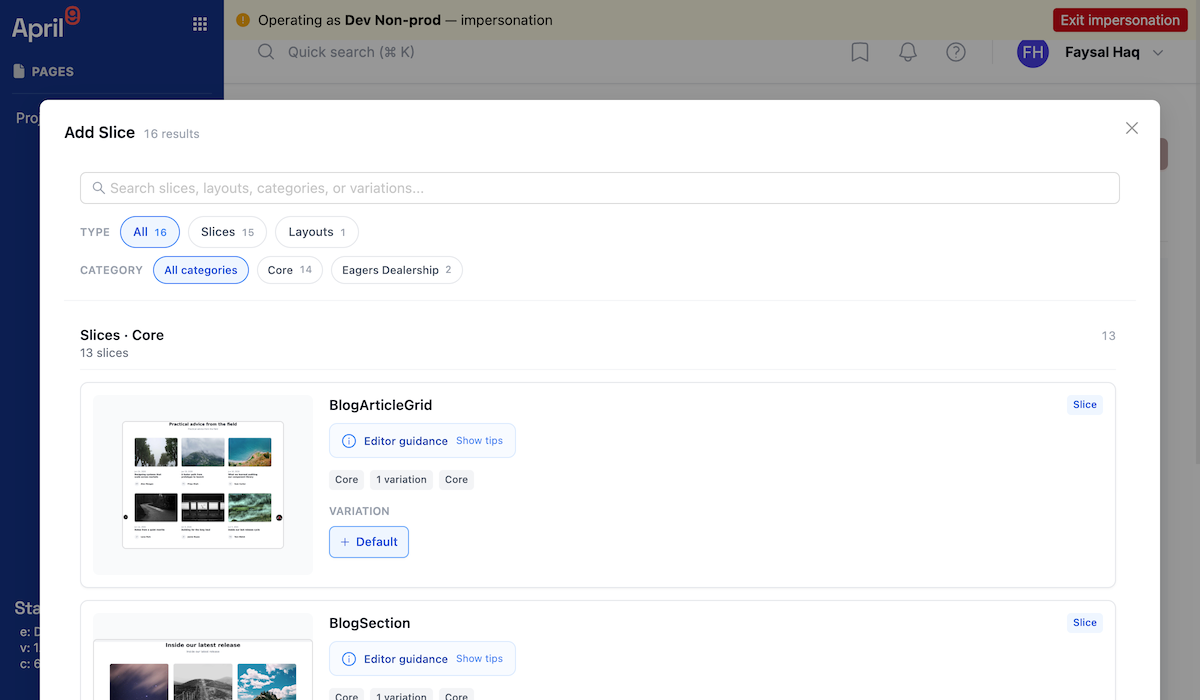
A slice model is a reusable content component. Slice Models carry governance metadata that drives a faceted, searchable picker in the editor.
| Field | Type | Notes |
|---|---|---|
id | string | |
type | "SharedSlice" | |
name, description | string | |
kind | "section" | "layout" | "block" | Default "section". section/layout are addable at the page's top level; block is only placeable inside a layout's column. |
origin | "core" | "bespoke" | Default "bespoke". core = a Core Slice, tenant-owned and consumed by every Business Unit. bespoke = a Business Unit Fork, a separately-owned definition derived from a Core Slice — it does not intercept updates to the Core Slice it came from. |
status | "stable" | "beta" | "deprecated" | Default "stable". Drives picker badging/default filtering. |
category, tags[], keywords[] | Facets for the picker. | |
variations[] | array | Each has id, name, description, docURL, version, imageUrl (screenshot), primary (field-definition map), items (repeatable field-definition map), and columns[] (for layout kind — { allow: "*" | string[] }, the allow-list of Block ids placeable in that column). |
List slice models (faceted)
GET /api/pages/{project_id}/slice-model
Query parameters
| Parameter | Type | Description |
|---|---|---|
page, limit | number | Pagination. |
searchText | string | Free-text search. |
sortBy | "created_at" | "updated_at" | |
kind[] | array | Filter by section/layout/block. |
category[], tags[], media[] | array | Facet filters. |
origin[] | array | Filter by core/bespoke. |
status[] | array | Filter by stable/beta/deprecated. |
availableSliceIds[] | array | Restrict results to this allow-list of slice ids. |
Example response
{
  "results": [
    {
      "version": 1,
      "created_at": "2026-01-15T10:00:00.123Z",
      "project_id": "corporate-site",
      "id": "hero_banner",
      "type": "SharedSlice",
      "name": "Hero Banner",
      "description": "Full-width hero section with image and CTA",
      "kind": "section",
      "origin": "core",
      "status": "stable",
      "category": "Marketing",
      "tags": ["hero"],
      "keywords": [],
      "variations": [
        {
          "id": "default",
          "name": "Default",
          "version": "1.0.0",
          "imageUrl": "/slice-screenshots/hero_banner/screenshot-default.png",
          "primary": {
            "heading": { "type": "Text", "config": { "label": "Heading" } }
          },
          "items": {}
        }
      ]
    }
  ],
  "total": 1,
  "totalPages": 1,
  "facets": {
    "category": { "Marketing": 4, "Content": 9 },
    "tags": { "hero": 2 },
    "media": {},
    "origin": { "core": 11, "bespoke": 2 },
    "status": { "stable": 12, "beta": 1 }
  }
}
Create or update a slice model
PUT /api/pages/{project_id}/slice-model
Request body
{
  "id": "testimonial",
  "type": "SharedSlice",
  "name": "Customer Testimonial",
  "description": "Display a customer testimonial with rating",
  "kind": "section",
  "origin": "bespoke",
  "status": "beta",
  "category": "Marketing",
  "tags": ["social-proof"],
  "keywords": [],
  "variations": [
    {
      "id": "default",
      "name": "Default",
      "version": "1.0.0",
      "primary": {
        "quote": { "type": "StructuredText", "config": { "label": "Quote" } },
        "author_name": { "type": "Text", "config": { "label": "Author Name" } }
      },
      "items": {}
    }
  ]
}
Example response
{ "id": "testimonial" }
Delete a slice model
DELETE /api/pages/{project_id}/slice-model/{id}
Slice models describe editorial structure (Prismic-style field defs) for the CMS. The typed authoring primitives for building a Slice's UI (the Slice Devkit) and the renderer that answers live-preview messages live in your own consumer web application, not in this API — see Live Preview & Preview Tokens.
Documents
Documents are content instances created from a document model.
| Field | Type | Notes |
|---|---|---|
id | string | |
uid | string (^[a-z0-9_-]+$) | URL-friendly identifier. |
name | string | |
document_model_id | string | |
status | "draft" | "live" | "archived" | |
data | string | Opaque, JSON-stringified string. Parse/serialize it yourself; Stack9 does not inspect or reshape its contents. |
created_by_id, updated_by_id | string, nullable |
Get a document
GET /api/pages/{project_id}/document
Pass at least one of id, document_model_id, or uid as a query parameter to identify the document.
Example request
curl -X GET \
  'https://apis.app.stack9.co/api/pages/corporate-site/document?uid=homepage' \
  -H 'X-API-Key: your-api-key-here'
Example response
{
  "version": 3,
  "created_at": "2026-01-15T10:00:00.123Z",
  "updated_at": "2026-02-20T10:00:00.000Z",
  "project_id": "corporate-site",
  "document_model_id": "page",
  "id": "doc_001",
  "uid": "homepage",
  "name": "Homepage",
  "status": "live",
  "created_by_id": "user_123",
  "updated_by_id": "user_456",
  "data": "{\"title\":\"Welcome\",\"sections\":[{\"slice_type\":\"hero_banner\",\"primary\":{\"heading\":\"Transform Your Business\"}}]}"
}
List documents
POST /api/pages/{project_id}/document/list
Request body
{
  "page": 1,
  "limit": 20,
  "search": "homepage",
  "filters": {
    "status": { "operation": "eq", "value": "live" },
    "document_model_id": { "operation": "eq", "value": "article" }
  }
}
Filterable fields: status, document_model_id, uid, name, created_at, updated_at. Supported operation values: eq, ne, between, like, nlike, gt, lt, gte, lte, in, nin, empty, nempty, nemptyarray.
Example response
{
  "results": [
    {
      "project_id": "corporate-site",
      "document_model_id": "article",
      "id": "doc_article_001",
      "uid": "introducing-new-features",
      "name": "Introducing New Features",
      "status": "live",
      "data": "{\"title\":\"Introducing New Features\"}",
      "created_at": "2026-02-25T09:00:00.000Z",
      "version": 1
    }
  ],
  "total": 1,
  "totalPages": 1
}
Create or update a document
PUT /api/pages/{project_id}/document/{id}
Request body
{
  "document_model_id": "product",
  "uid": "premium-laptop-x1",
  "name": "Premium Laptop X1",
  "status": "draft",
  "data": "{\"name\":\"Premium Laptop X1\",\"sku\":\"LAPTOP-X1-2024\",\"price\":1299.99}"
}
document_model_id, uid, name, status, and data are all required — data must be a JSON-stringified string, not a nested object.
Example response
{ "id": "prod_001" }
Delete a document
DELETE /api/pages/{project_id}/document/{id}
Search documents across models (typeahead)
POST /api/projects/{project_id}/pages/document/search
A lightweight search by name or UID, optionally scoped to specific document models — built for populating a document-link field's typeahead, not for paginated browsing (use List documents for that).
Note the path prefix here is /projects/{project_id}/pages/..., not /pages/{project_id}/... like every other endpoint on this page — that's a real inconsistency in the API, not a typo in this doc.
Request body
{ "search": "laptop", "document_model_ids": ["product"], "limit": 10 }
Example response
[
  { "id": "prod_001", "name": "Premium Laptop X1", "uid": "premium-laptop-x1", "document_model_id": "product", "status": "draft" }
]
Live Preview & Preview Tokens
The Pages editor renders content through your own consumer application's real renderer (loaded in an iframe, driven by postMessage), not through a mock in the CMS — "the editor promises exactly what the renderer delivers." This API's role is narrow: persist the current (possibly unsaved) editor state as a snapshot, and hand back a shareable token that resolves that snapshot without requiring authentication on the reader's side.
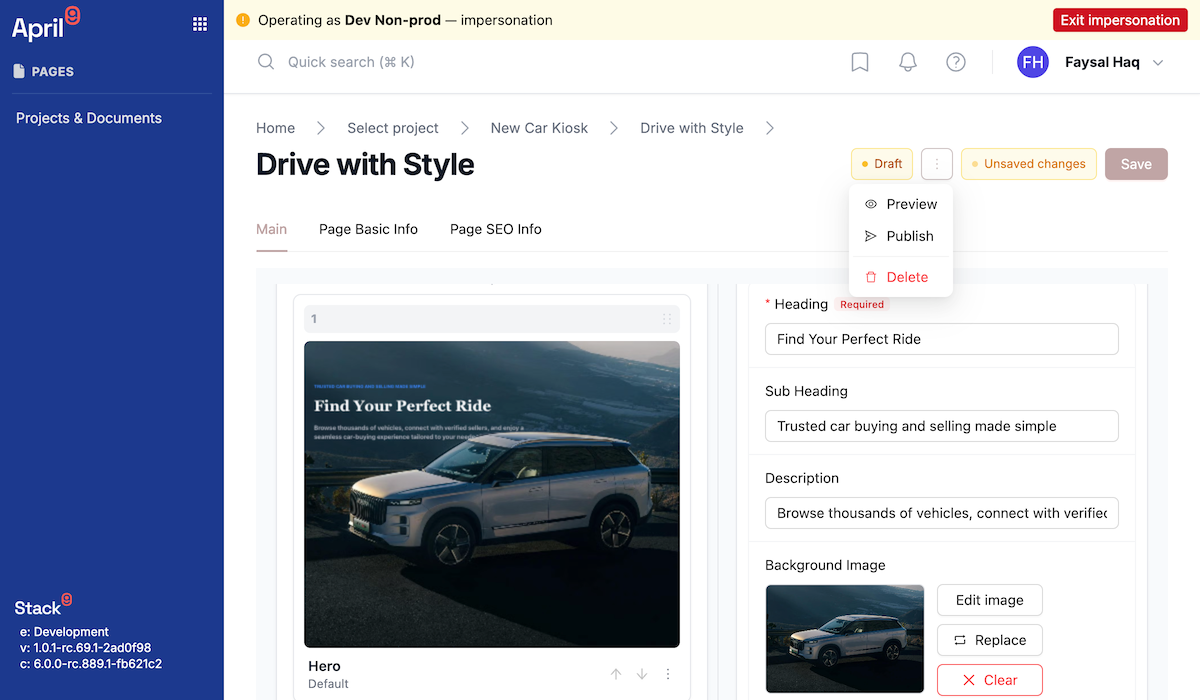
The iframe/postMessage bridge and the component that actually renders a Slice tree live in your own consumer web application (or a sibling module you build), not inside this API or the stack9-pages-react package. This API only stores and serves the snapshot payload.
Save a preview snapshot
POST /api/pages/{project_id}/document/{document_id}/preview-snapshot
Request body
{ "snapshot": "{\"formValues\":{...},\"slices\":[...]}" }
snapshot is a string — typically your own serialized editor state, including edits that haven't been saved to the document yet.
Example response
{ "token": "0f8fad5b-d9cb-469f-a165-70867728950e" }
Get a preview snapshot by token
GET /api/pages/preview/{token}
Publicly fetchable by anyone holding the token (issuing the token is what's authenticated — reading it back is not).
Example response
{
  "token": "0f8fad5b-d9cb-469f-a165-70867728950e",
  "project_id": "corporate-site",
  "document_id": "doc_001",
  "document_model_id": "page",
  "uid": "homepage",
  "snapshot": "{\"formValues\":{...},\"slices\":[...]}",
  "created_at": "2026-02-20T10:00:00.000Z",
  "updated_at": "2026-02-20T10:00:00.000Z"
}
Redirects
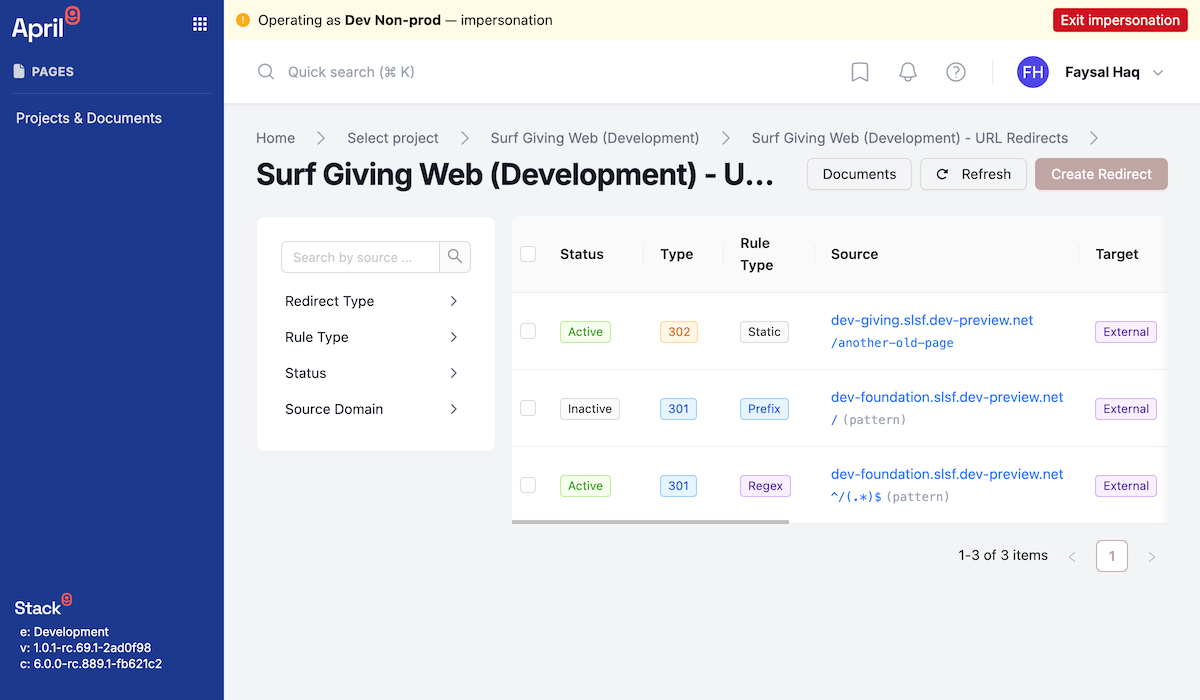
URL redirect rules for a project's domains, plus a public check endpoint your edge/framework middleware can call directly.
| Field | Type | Notes |
|---|---|---|
source_domain | string | Must be one of the project's allowed domains. |
rule_type | "static" | "prefix" | "regex" | Default "static". |
source_url_path, target_url | string | Required for static rules. |
source_pattern, target_pattern | string | Required for prefix/regex rules. For regex, target_pattern may use $1, $2 capture-group placeholders. |
redirect_type | "301" | "302" | "308" | |
priority | number | Default 0. Higher priority is checked first when pattern rules overlap. |
is_active | boolean | |
is_external | boolean | Read-only. true if the target is on a different domain than the source. |
Create a redirect
POST /api/pages/{project_id}/redirects
Example request
{
  "source_domain": "www.example.com",
  "source_url_path": "/old-page",
  "target_url": "/new-page",
  "redirect_type": "301",
  "is_active": true,
  "rule_type": "static"
}
Example response
{ "id": "redir_9kL3mP5n" }
Check a redirect (public)
POST /api/pages/{project_id}/redirects/check
Designed to be called from frontend framework middleware on every request — no interactive auth is expected on the caller side beyond the API key your framework holds server-side.
Example request
{ "source_domain": "www.example.com", "source_url_path": "/old-page" }
Example response — match
{ "redirect": true, "redirect_type": "301", "target_url": "/new-page", "is_external": false }
Example response — no match
{ "redirect": false }
List redirects
POST /api/pages/{project_id}/redirects/list
Returns { results[], total, totalPages } using the redirect shape above.
Get, update, or delete a redirect
GET    /api/pages/{project_id}/redirects/{id}
PUT    /api/pages/{project_id}/redirects/{id}
DELETE /api/pages/{project_id}/redirects/{id}
PUT accepts the same body as create.
Site Settings
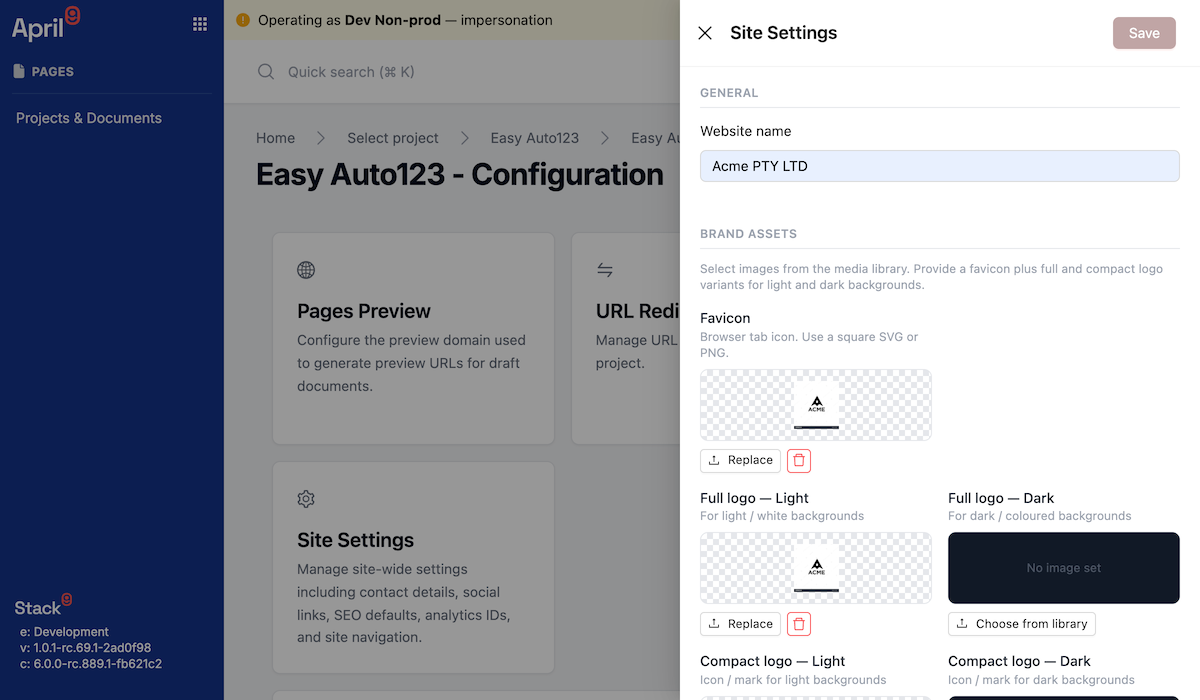
A per-project singleton (id: "site_settings") for brand assets, typography, navigation, social, analytics, and SEO defaults.
Get or update site settings
GET /api/pages/{project_id}/site-settings
PUT /api/pages/{project_id}/site-settings
Example request (PUT)
{
  "website_name": "Acme Co",
  "favicon": { "url": "https://cdn.example.com/favicon.png", "alt": "Acme favicon" },
  "logo_full_light": { "url": "https://cdn.example.com/logo-light.svg", "alt": "Acme logo" },
  "typography": {
    "body": { "source": "google", "family": "Inter", "googleFamily": "Inter" },
    "heading": { "source": "google", "family": "Poppins", "googleFamily": "Poppins" }
  },
  "nav_header": "nav_header_slice_id",
  "nav_footer": "nav_footer_slice_id",
  "social_facebook": "https://facebook.com/acmeco",
  "ga_measurement_id": "G-XXXXXXX",
  "default_meta_title": "Acme Co",
  "default_meta_description": "Acme Co builds things."
}
Image fields (favicon, logo_full_light, logo_full_dark, logo_compact_light, logo_compact_dark) use the same shape as any other Pages image field — { id?, url, alt?, edits? }, where edits can carry focal, per-variant thumbnails, and caption. typography.body/typography.heading are FontDef objects: { source: "system" | "google" | "custom", family, weights?, italic?, googleFamily?, fileId?, url?, faceName?, format? }.
Example response (PUT)
{ "id": "site_settings" }
Project Duplication & Template Sync
Duplicate a project
Cloning an entire project (documents, models, and screenshots) into another Business Unit as a new, independently-owned project. Ownership of Pages projects is immutable, so cross-Business-Unit sharing works by copying, not by moving.
Run the preflight check first — it enumerates private File Manager references that would otherwise leak private assets across Business Units:
POST /api/pages/{project_id}/duplicate/preflight
{ "target_business_unit_id": "bu_sales_east" }
{
  "ok": true,
  "source_project_id": "corporate-site",
  "target_business_unit_id": "bu_sales_east",
  "blocking_references": [],
  "allowed_reference_count": 42,
  "scanned_document_count": 18
}
If blocking_references is non-empty, resolve those file references (e.g. move the referenced files into the Shared library) before duplicating.
POST /api/pages/{project_id}/duplicate
{ "target_business_unit_id": "bu_sales_east", "name": "East Region Site" }
{
  "project_id": "corporate-site-copy-1",
  "business_unit_id": "bu_sales_east",
  "sliceModels": 14,
  "documentModels": 3,
  "screenshots": 22,
  "documents": 18
}
Sync from a Pages Template
If a project was provisioned from a Pages Template, it can re-sync slice models, document models, and screenshots from that template to pick up upstream improvements without losing its own document content:
POST /api/pages/{project_id}/sync-with-template
No request body.
{
  "ok": true,
  "sliceModels": 14,
  "documentModels": 3,
  "screenshots": 22,
  "pruned": 1,
  "screenshotFailures": [],
  "syncedTemplateVersion": 5
}
pruned counts models removed from the target because the template no longer has them. Compare syncedTemplateVersion against the template project's template_version (from Project Metadata) to detect drift.
Creating a Pages Template and deploying models into it are operator/administration actions, out of scope for this public reference. sync-with-template and duplicate/duplicate/preflight are the customer-facing part of that workflow.
Attachment Management
GET /api/pages/{project_id}/attachment/signed-url
Query parameters
| Parameter | Type | Required | Description |
|---|---|---|---|
object_ref | string | Yes | Object key/reference for the attachment. |
intent | "upload" | "download" | Yes | |
content_type | string | No | Set on upload intent so the signed URL enforces the right Content-Type. |
Example response
{ "url": "https://storage.example.com/corporate-site/images/hero-banner.jpg?X-Amz-Signature=..." }
PUT the file bytes directly to the returned url for an upload, or GET it directly for a download — the response does not include separate headers/expiry/size metadata beyond the URL itself.
This legacy per-project attachment endpoint is distinct from the File Manager API's /file_manager/sign-put-url, which is the asset-library upload path used by the Documents Manager UI (and, in turn, by Pages image fields via the file picker). This endpoint is primarily used for slice screenshots and other project-internal attachments.
Roadmap
- Image pipeline delivery — Transformed Image URLs (imgproxy resize/crop/format), Image Variants/Breakpoints, and File Revision cache-busting are on a hardening track; production, broker-signed transform URLs are not generally available yet. Editorial
edits(focal point, crop, caption) on image fields are stored and round-trip correctly today, but the delivery-side transform is not guaranteed live in your environment. - RichText-embedded images do not currently carry focal/crop
edits— only images placed directly in an Image field do.
Related
- File Manager API — the asset library Pages image fields pick from.
- Business Units API — how Business Unit ownership and the Shared library work.
- Entity Versioning & Audit API — version history and deleted-record recovery for
pages_document,pages_document_model,pages_slice_model,pages_project_metadata,pages_url_redirect, andpages_site_settings.