How to preview Pages
Stack9 Pages does not draw its own approximation of your site. It renders each Slice by posting the editor's data into your actual renderer, so the editor promises exactly what the published site delivers. The same mechanism backs a shareable, tokenised snapshot link for reviewers who never open the CMS.
What you'll build
Both preview surfaces, end to end:
- A
/slice-previewroute in your consumer web app that renders Slices from posted data - A
/preview/{token}route that renders a whole saved snapshot - A configured Preview Domain on the Pages project
- Live preview working in the editor, tracking unsaved edits
- A shareable snapshot link an editor can send to a reviewer
Time to complete: 60-90 minutes (mostly consumer-app work)
Prerequisites
- A Pages project with at least one document and one Slice
- Access to the consumer web app that renders your site, and the ability to deploy a route to it
- A DXP API key (
X-API-Key) for the configuration calls - Familiarity with the Slice vocabulary: Slice, Layout, Wrapper, Block, and Column (Zone)
How it works
The CMS is not the canonical renderer — your consumer app is. This is the render side of the Slice Rendering Contract.
   Pages editor (CMS)                  Your consumer app
 ┌────────────────────┐            ┌────────────────────────┐
 │  document editor   │  iframe →  │  /slice-preview        │
 │  live form values  │            │  renders one Slice     │
 │                    │ ← READY    │  or a whole Slice list │
 └────────────────────┘  postMessage└────────────────────────┘

 ┌────────────────────┐            ┌────────────────────────┐
 │  Preview page btn  │  token →   │  /preview/{token}      │
 │  saves a snapshot  │            │  fetches + renders it  │
 └────────────────────┘            └────────────────────────┘
Two surfaces, one renderer:
| Surface | Where it renders | Who sees it | Data source |
|---|---|---|---|
| Live preview | An iframe inside the editor, loading {previewDomain}/slice-preview | The editor, live, including unsaved edits | postMessage from the CMS |
| Preview snapshot | A new tab at {previewDomain}/preview/{token} | Anyone with the link | The snapshot the CMS persisted |
Step 1: Implement the /slice-preview route
Add a route to your consumer app that mounts your normal Slice renderer and waits for data over postMessage.
The message contract
Messages the CMS sends to your route:
| Message | Payload | When |
|---|---|---|
SLICE_DATA | sliceType, variation, primary, items, sliceId, columns, wrapper, useMock | A single Slice's data changed (debounced ~150 ms) |
SLICE_LIST | An ordered list of Slice payloads | Whole-page preview, one module graph instead of one iframe per Slice |
THEME_VARS | vars, darkMode | Theme tokens changed (debounced ~200 ms) |
INSPECT_MODE | Enable or disable element inspection | The editor enters point-and-edit |
HIGHLIGHT_TOKENS | Tokens to highlight | Theme token diffing |
Messages your route sends back:
| Message | Payload | Meaning |
|---|---|---|
READY | availableSliceTypes | The renderer booted and here is what it can render. Send this or the preview never activates. |
RESIZE | Content height | Lets the CMS size the frame to the content |
ERROR | Error detail | Render failed; the CMS surfaces it to the editor |
FOCUS_FIELD | Field path | The user clicked a rendered element; focus that field in the editor |
ELEMENT_SELECTED | Element identity | Inspect mode selection |
INSPECT_EXIT | — | The user left inspect mode |
WHEEL | Scroll delta | Forwards scrolling to the host page |
A minimal implementation
// app/slice-preview/page.tsx (consumer web app)
import { useEffect, useState } from 'react';
import { SliceZone } from '../components/SliceZone';

// Only trust messages from your CMS origin.
const CMS_ORIGIN = process.env.NEXT_PUBLIC_CMS_ORIGIN;

const AVAILABLE_SLICE_TYPES = ['hero', 'feature_grid', 'cta_split', 'rich_text'];

export default function SlicePreview() {
  const [slices, setSlices] = useState([]);
  const [themeVars, setThemeVars] = useState({});
  const [darkMode, setDarkMode] = useState(false);

  useEffect(() => {
    function onMessage(event) {
      if (CMS_ORIGIN && event.origin !== CMS_ORIGIN) return;

      const { type, payload } = event.data ?? {};

      switch (type) {
        case 'SLICE_DATA':
          setSlices([payload]);
          break;
        case 'SLICE_LIST':
          setSlices(payload.slices);
          break;
        case 'THEME_VARS':
          setThemeVars(payload.vars);
          setDarkMode(Boolean(payload.darkMode));
          break;
        default:
          break;
      }
    }

    window.addEventListener('message', onMessage);

    // Announce readiness and declare what this renderer supports.
    window.parent.postMessage(
      { type: 'READY', payload: { availableSliceTypes: AVAILABLE_SLICE_TYPES } },
      CMS_ORIGIN ?? '*',
    );

    return () => window.removeEventListener('message', onMessage);
  }, []);

  // Report height so the CMS can size the frame to the content.
  useEffect(() => {
    const observer = new ResizeObserver(() => {
      window.parent.postMessage(
        { type: 'RESIZE', payload: { height: document.body.scrollHeight } },
        CMS_ORIGIN ?? '*',
      );
    });
    observer.observe(document.body);
    return () => observer.disconnect();
  }, []);

  return (
    <div style={themeVars} data-theme={darkMode ? 'dark' : 'light'}>
      <SliceZone slices={slices} />
    </div>
  );
}
Three details that decide whether this works:
- Send
READY. The CMS waits about 5 seconds for it before falling back to a static screenshot. Sidebar thumbnails allow longer (about 30 seconds) before reverting. - Report
availableSliceTypesaccurately. The editor reads this to know which Slices it can preview live. Omitting a type is safer than claiming one you cannot render. - Wrap errors. A Slice that throws should post
ERRORrather than blanking the frame, so the editor sees a diagnosable message instead of an empty box.
The preview frame runs with scripts enabled and same-origin access to its own document. Check event.origin against your CMS origin before acting on any message, and pass a specific target origin rather than * when posting back. Without that check, any page that can load your /slice-preview route can drive your renderer.
Step 2: Implement the /preview/{token} route
The snapshot route takes the token from the URL, fetches the stored editor state, and renders it with the same components:
curl -X GET 'https://apis.app.stack9.co/api/pages/preview/9f3c1a7e-2b40-4c8d-8f11-6a2e5d9c0b73' \
  -H 'X-API-Key: your-api-key-here'
{
  "token": "9f3c1a7e-2b40-4c8d-8f11-6a2e5d9c0b73",
  "project_id": "proj_7742",
  "document_id": "doc_5512",
  "document_model_id": "landing_page",
  "uid": "spring-campaign",
  "snapshot": "{\"formValues\":{...},\"slices\":[...]}",
  "created_at": "2026-01-01T09:12:44.000Z",
  "updated_at": null
}
snapshot is an opaque serialised string of the editor state — parse it in your app and feed it to the same Slice renderer your published pages use. Do not reshape it on the way through; treating it as opaque is what lets new editorial fields appear without breaking the round trip.
Anyone holding a snapshot token can view that unpublished content. Treat the link as a secret: keep these routes out of your sitemap, send X-Robots-Tag: noindex, and avoid pasting tokens into public tickets or chat channels. If your content is commercially sensitive before launch, put your own authentication in front of the /preview/* route rather than relying on the token's obscurity.
Step 3: Set the Preview Domain
The CMS needs to know which origin hosts your renderer. Set it once per Pages project.
In the editor, open the preview configuration and enter the domain:
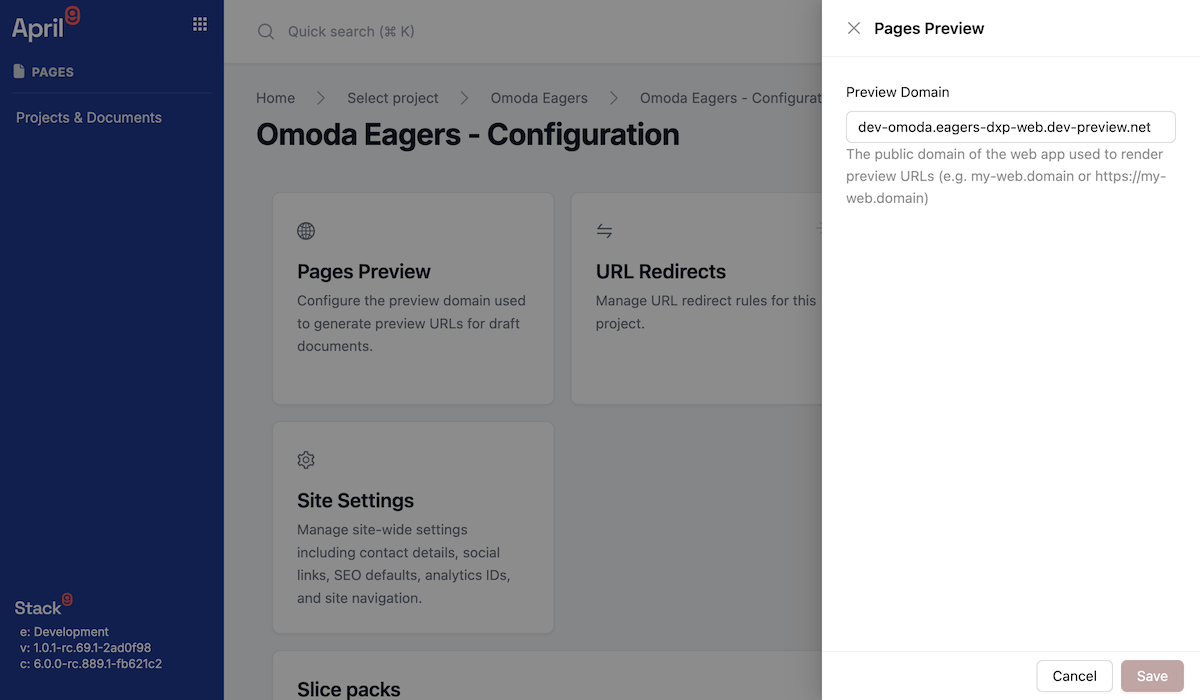
It is stored on the project's metadata as the preview configuration domain, and you can set it over the API:
curl -X PUT 'https://apis.app.stack9.co/api/pages/project_metadata/proj_7742' \
  -H 'X-API-Key: your-api-key-here' \
  -H 'Content-Type: application/json' \
  -d '{
    "name": "Northside Motors Website",
    "preview_config": { "domain": "https://www.northside.example.com" }
  }'
The CMS probes reachability before loading anything, so a wrong or unreachable domain degrades to static screenshots rather than hanging the editor.
Use a stable, deployed environment — a staging domain that always runs the current renderer is the right choice. Pointing this at a developer's laptop works for development but produces confusing "preview unavailable" states for everyone else.
Step 4: Use live preview in the editor
Open a document. The Slice sidebar shows live thumbnails, and the canvas shows the composed page.
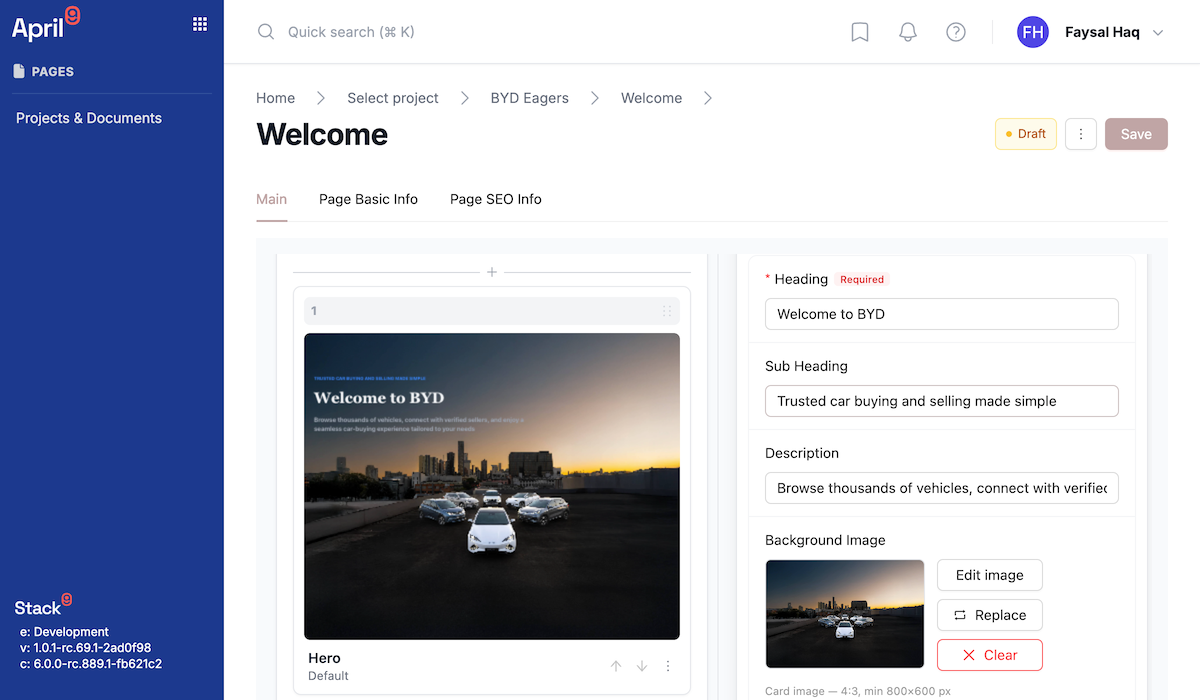
What editors should know:
- No save required. Edits flow into the preview from the live form values, debounced, so previews track unsaved work.
- Undo and redo cover 50 steps across both field values and Slice composition.
- Thumbnails start static and go live. Out-of-viewport Slices show a stored screenshot; when a thumbnail warms up and reports readiness, it swaps to the live render, and reverts to the screenshot if it times out.
- Point-and-edit works both ways. Clicking a rendered element focuses the corresponding field, if your renderer posts
FOCUS_FIELD.
Step 5: Share a tokenised snapshot
When an editor clicks Preview page, the CMS persists the current editor state — including unsaved edits — receives a token, and opens {previewDomain}/preview/{token} in a new tab.
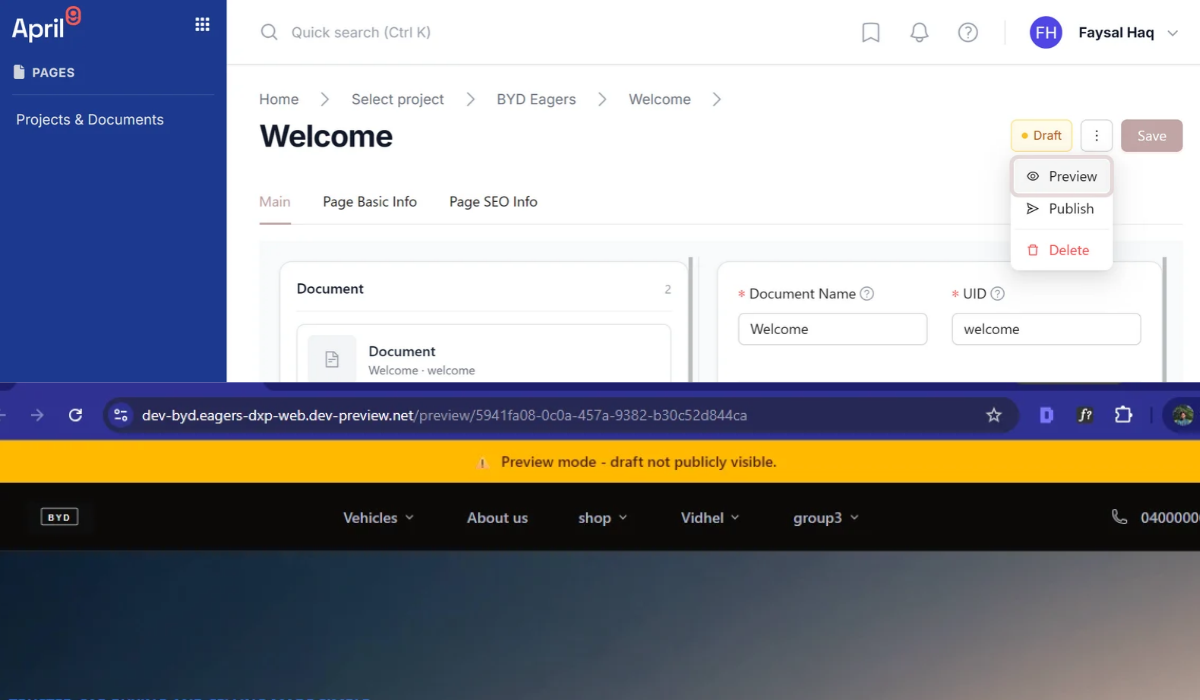
The same flow over the API:
curl -X POST 'https://apis.app.stack9.co/api/pages/proj_7742/document/doc_5512/preview-snapshot' \
  -H 'X-API-Key: your-api-key-here' \
  -H 'Content-Type: application/json' \
  -d '{
    "snapshot": "{\"formValues\":{\"title\":\"Spring Campaign\"},\"slices\":[{\"id\":\"hero__8f21\",\"variation\":\"default\"}]}"
  }'
{ "token": "9f3c1a7e-2b40-4c8d-8f11-6a2e5d9c0b73" }
Then share https://www.northside.example.com/preview/9f3c1a7e-2b40-4c8d-8f11-6a2e5d9c0b73.
Each click produces a new snapshot and a new token. Snapshots are point-in-time: a reviewer opening yesterday's link sees yesterday's state, not the current draft. Send a fresh link after each round of changes.
Step 6: Prefer whole-page preview for composed pages
There are two live-preview shapes, and the difference matters at scale:
| Single-Slice frames | Whole-page preview | |
|---|---|---|
| Frames | One iframe per Slice | One iframe for the page |
| Renderer instances | One per Slice | One module graph |
| Best for | Sidebar thumbnails, isolated Slice authoring | The composed canvas, theme work, inspect mode |
| Extra messages | — | SLICE_LIST, INSPECT_MODE, HIGHLIGHT_TOKENS in; ELEMENT_SELECTED, INSPECT_EXIT, WHEEL out |
Handle SLICE_LIST in the same route as SLICE_DATA — as in Step 1 — and a single renderer instance serves both shapes. The payload nests as Page → Section → Block, matching the composition model.
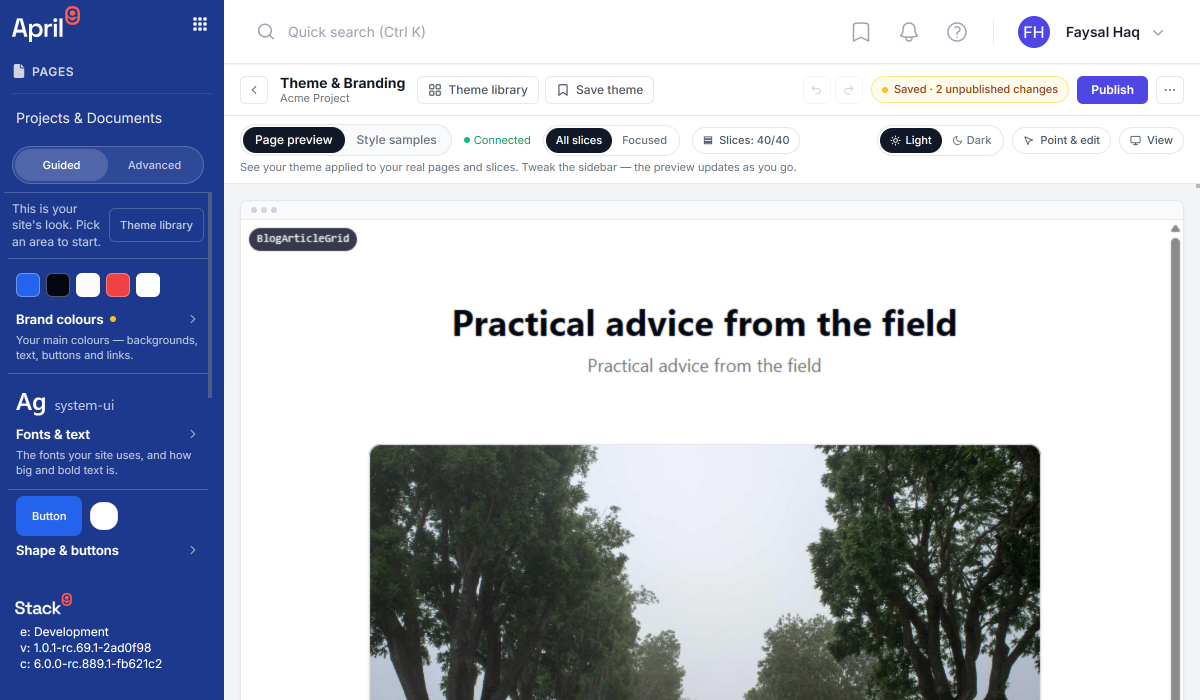
Theme work uses the same channel: THEME_VARS carries the token values and the light or dark flag, so the theme configurator's live page preview, device widths, and light/dark comparison all run through your renderer.
Troubleshooting
The preview pane shows "preview unavailable" or a static screenshot
Work outwards: is the Preview Domain set and correct; is the domain reachable from the browser (the CMS probes it before loading); does /slice-preview return 200; and does the route post READY? A missing READY message is the single most common cause — the CMS waits about 5 seconds, then falls back.
One Slice previews but others show screenshots
Those Slice types are not in availableSliceTypes. Add them to the array your route reports, and confirm the renderer really can render them — claiming a type you cannot render turns a clean fallback into a broken frame.
Thumbnails never go live
Thumbnails allow about 30 seconds for readiness before reverting to the stored screenshot. A renderer bundle that takes that long to boot is the usual cause. Check that the preview route is code-split away from your full site bundle.
Edits do not appear in the preview
Data is debounced, so allow a moment. If it still does not update, your route is probably not handling the message type being sent — log every inbound message once and confirm you handle both SLICE_DATA and SLICE_LIST.
Messages are ignored entirely
Your origin check is rejecting them. Log event.origin and compare it with the CMS origin, including protocol and port.
The frame renders but has no styling
THEME_VARS is not being applied. Confirm you spread the token values onto a wrapping element and honour the dark mode flag.
The snapshot link renders a blank page
Your /preview/{token} route fetched the snapshot but could not parse it. snapshot is an opaque JSON string — parse it, and do not assume a schema beyond what your renderer needs.
A reviewer says the snapshot is out of date
It is, by design. Snapshots are point-in-time. Generate a new link.
Images look different in preview versus published
Preview and publish share the same render path, so check the image data rather than the pipeline: crop, focal point, and aspect are stored per instance on the field value as normalised fractions, and replacing an image source clears those edits.
Transformed image URLs are produced by an image proxy whose production URL signing is still on a hardening track, and the numeric File Revision used for cache-busting is not shipped. Verify what is live in your release before making performance claims or depending on a transformed-URL contract, and expect originals to be served as the fallback when the proxy is not configured.
Next steps
- Pages and Documents API — document, model, and Slice model contracts
- How to manage files with Documents Manager — where preview images come from
- How to set up Business Units — Core Slices versus Business Unit Forks, and previewing inside the Active Business Unit
- Content Management — how Pages fits the wider content model