MCP Server
Instance MCP lets a Stack9 instance publish a subset of its existing configuration — query-library queries and webhook automations — as Model Context Protocol tools, served from an OAuth 2.1-protected endpoint on the instance itself.
An MCP-compatible AI agent that can authenticate to your Stack9 instance can then discover those tools, call them, read your data, and trigger your automations — without any bespoke integration code on either side.
   AI agent / MCP client                Stack9 Core instance
  ┌──────────────────────┐            ┌──────────────────────────────────────────┐
  │  tools/list          │  POST +    │  /api/mcp/{mcpKey}                       │
  │  tools/call          │  Bearer    │    ├─ OAuth 2.1 resource server gate     │
  │                      │ ─────────► │    │   (audience-bound token, mcp:tools) │
  │                      │            │    ├─ reads mcps/{mcpKey}.json           │
  │                      │ ◄───────── │    ├─ builds one MCP tool per entry      │
  └──────────────────────┘  JSON /    │    │   + built-in stack9_whoami          │
                            SSE       │    └─ per-tool authorisation             │
                                      │         ├─ query / serverAction          │
                                      │         │     → screen query permission  │
                                      │         └─ automation → automation perm  │
                                      └──────────────────────────────────────────┘
Used by Stack9 AI Agents
The Instance MCP endpoint is how Stack9 AI Agents read Stack9 data and trigger Stack9 automations. An agent connects as an OAuth client, acts as the user who approved its grant, and is authorised tool by tool exactly as that user would be — so granting an agent a tool never widens what it can reach beyond that user's own access. Any other MCP client, such as Claude Code, connects the same way; see Connect Claude Code to a Stack9 MCP endpoint.
Why Instance MCP exists
Teams building on Stack9 have already modelled their data as entities, their reads as query-library queries, and their business logic as automations. Historically, making that available to an AI agent meant writing and maintaining a separate integration layer: an HTTP wrapper, a tool schema, and a second copy of your permission logic.
Instance MCP removes that layer:
- ✅ Reuses existing config — a tool is just a pointer to a query key or an automation key.
- ✅ Reuses existing permissions — every tool is authorised against the same screen-query and automation permissions your screens and webhook routes enforce.
- ✅ Auto-derives input schemas — from a query's generated input model, or from an automation's entry action type contract.
- ✅ Authored in the Console or in files — both paths write the same JSON.
- ✅ Fails closed — anything the server cannot positively authorize is refused.
Instance MCP is a Stack9 Core feature. It is independent of DXP client/provider mode and does not require it.
Core concepts
| Concept | What it is |
|---|---|
| MCP server | One named collection of tools, defined by a single JSON config (S9McpConfig). Each MCP server gets its own endpoint URL. |
| Tool | One callable capability exposed to the agent (S9McpTool). Backed by a query, an automation, or a server action. |
| Source type | query (read data), automation (perform an action), or serverAction (a DXP-client server action). Determines both the execution path and the authorisation check. |
stack9_whoami | A built-in tool appended to every MCP server. Returns the instance name, environment, base URL, MCP key and the authenticated user every call runs as. |
| MCP endpoint URL | {coreBaseUrl}/api/mcp/{mcpKey} — one URL per MCP server, and one OAuth resource identifier per URL. |
| Stateless requests | The endpoint speaks the MCP 2026-07-28 revision: no handshake and no Mcp-Session-Id. Every request stands alone and is authorised against its own credential. Clients on the 2025-era protocol are served through the SDK's stateless legacy fallback. |
Source types
query tools are read-only. They run a query-library query through the query service, gated by the screen-query permission that exposes that query — see Security model.
automation tools are the action side. They run one Stack9 automation with the webhook trigger type — automationKey if the tool sets it, otherwise the tool key — passing the tool arguments as the automation body.
serverAction tools run a server action through the screen query that declares it (serverAction: true on a screen's queries[] entry). Instance-defined server actions are a DXP client capability; see the MCP schema reference.
"Webhook automation" here means a Stack9 automation whose triggerType is webhook. It is unrelated to the DXP Webhooks feature (outbound HTTP callbacks).
Architecture
Configs are files, not database rows
An MCP server is a JSON file:
{instance}/src/mcps/{mcpKey}.json
This matters operationally: MCP configs travel with your instance source, exactly like queries, screens, and automations. They are reviewed in pull requests, versioned in git, and deployed with your build — not edited in a production database.
At request time the server aggregates MCP configs from three locations, in this order:
- Core built-ins — the framework's own
mcps/directory. - Your instance —
src/mcps/in development, the compileddist/mcps/output otherwise. - Installed modules — each module's
mcps/directory.
Duplicate key values are de-duplicated on load and the first match wins, following the order above.
Configs sourced from a module carry a module field and are read-only: the writer refuses to update, rename, or delete them, so a module can ship a curated MCP server that an instance cannot silently mutate.
The Console writes to src/mcps/, but a non-development runtime reads the built dist/mcps/ output. Treat Console authoring as a development-time workflow: author locally, commit the JSON, and deploy. Editing an MCP config against a deployed instance is not a substitute for a release.
Request lifecycle
- A request arrives at
/api/mcp/{mcpKey}. The route is mounted outside the generic authenticated router, behind its own OAuth 2.1 resource-server gate (mcpResourceAuthMiddleware), which runs before any database transaction is opened. A request without an acceptable credential is answered401with aWWW-Authenticatechallenge — see Security model. - The handler loads the MCP config fresh from disk on every request, so config changes are picked up by the next request without a restart.
- Unknown
mcpKey→404. - The server builds the tool set for this request only: one tool per config entry plus
stack9_whoami. For each tool it makes a single authorisation decision against the request's verified identity. tools/listadvertises only the tools the caller is authorised to run. Tools the caller would be refused are withheld (and logged server-side), not shown and then failed.tools/callruns the tool's callback, which enforces the same decision that filtered the list, so what is advertised and what is enforced cannot drift.
There is no long-lived server or session whose identity could drift from the caller's: each request's tools close over that request's services, authenticated user and database transaction.
Authoring in the Console
The Console exposes MCP servers under App Builder → MCP Servers (/app-builder/mcps).
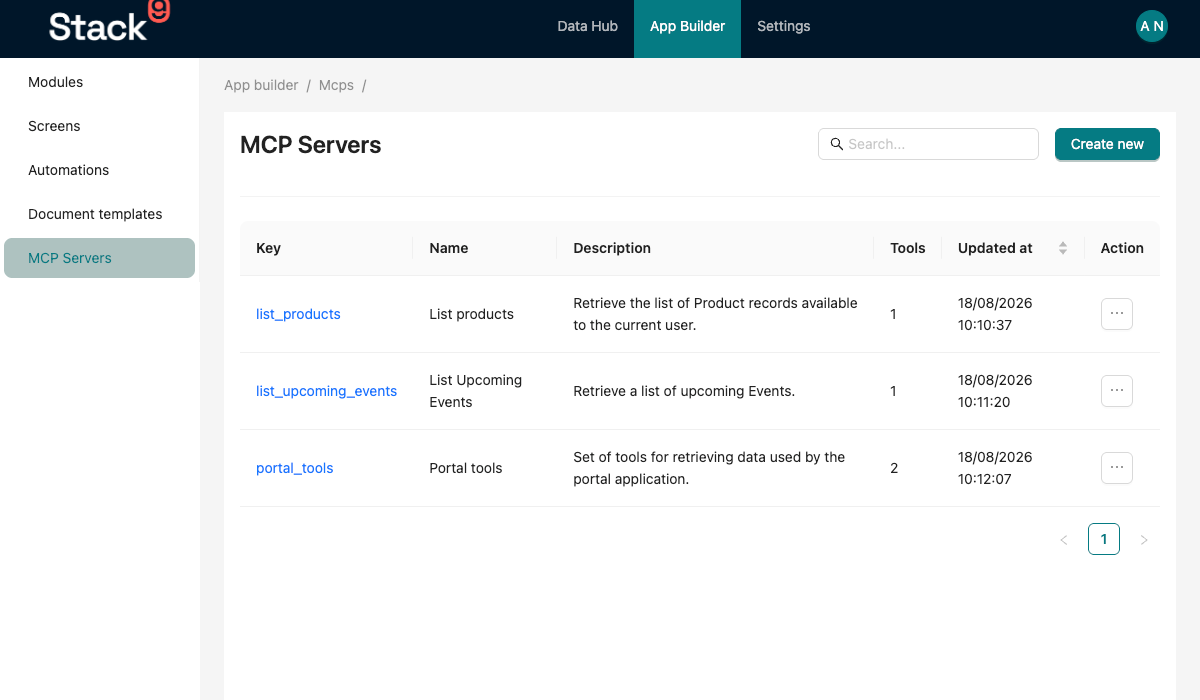
The list screen shows each MCP server's key, name, description, number of tools, and last-updated timestamp, with actions to open the detail screen or delete the server. Create new opens a drawer that captures the key, name, description, and at least one tool.
Opening a server takes you to the detail screen (/app-builder/mcps/detail/{mcpKey}), which has two tabs plus a Get MCP URL action in the overflow menu.
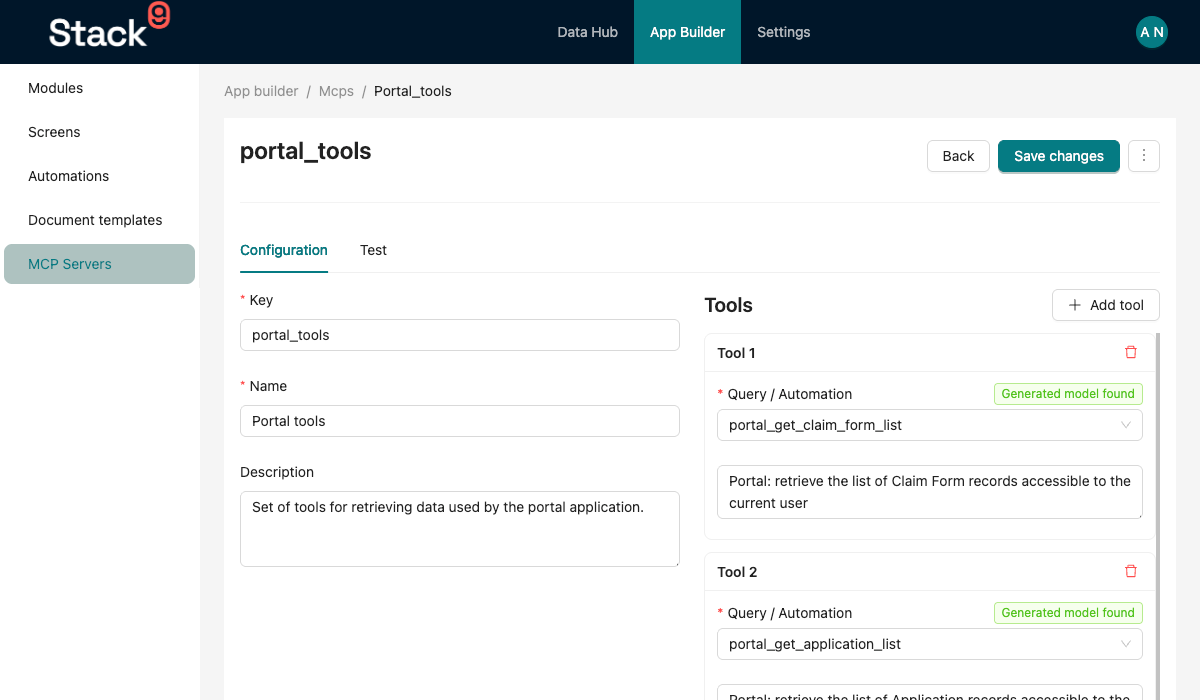
Configuration tab
Left column: the server's key, name, and description. Right column: a repeatable list of tool cards. Each card:
- Query / Automation — one grouped select with a Queries group and a Webhook Automations group. The automation list is filtered to automations whose trigger type is
webhook; everything else is not selectable. Internally the selection is stored asquery:{key}orautomation:{key}. - Schema badge — a live Generated model found / No generated model badge for query tools, resolved from the instance's generated models. When a generated model exists, the manual schema editor is hidden because the model is used instead.
- Description — pre-filled from the selected query's description and editable. This is the text the agent sees when deciding whether to call the tool, so it is worth writing deliberately.
- Input Schema — shown when there is no generated model. Add fields with a name, a type (
string,number,boolean,object,array), an optional description, and an Optional checkbox.
At least one tool is required.
Test tab
The Test tab is a real MCP client running in the browser: it lists the tools the server exposes, lets you fill in each tool's arguments, and shows the raw JSON result or error. It does not call the OAuth-protected endpoint on Core. It posts to the console server, which runs the identical MCP handler at its own /api/mcp/{mcpKey}, refuses outright unless NODE_ENV=development, and runs every tool as a fixed administrator actor. It is therefore a quick check that a config works, not a way to check per-role behaviour or demonstrate a permission denial — for that, connect a non-administrator over OAuth. See Connect Claude Code to a Stack9 MCP endpoint.
Get MCP URL
Displays and copies the endpoint for this server: {coreBaseUrl}/api/mcp/{mcpKey}. This is the URL to give an MCP client; the client discovers how to authenticate from it.
Authoring in files
The equivalent of the Console form is a plain JSON file. A minimal two-tool server:
{
  "key": "support_agent",
  "name": "Support Agent Tools",
  "description": "Read-only customer lookups plus ticket creation for the support assistant.",
  "tools": [
    {
      "key": "getcustomers",
      "name": "getcustomers",
      "description": "Search customers by name or email. Returns a paginated list.",
      "sourceType": "query"
    },
    {
      "key": "create_support_ticket",
      "name": "create_support_ticket",
      "description": "Create a support ticket for an existing customer.",
      "sourceType": "automation",
      "inputSchema": {
        "customer_id": { "type": "number", "description": "Stack9 customer id" },
        "subject": { "type": "string", "description": "One-line summary" },
        "body": { "type": "string", "description": "Full description" },
        "priority": {
          "type": "string",
          "description": "low | medium | high",
          "optional": true
        }
      }
    }
  ]
}
For the complete field-by-field reference, see the MCP API reference.
See also the worked examples in Samples → MCP Servers.
Tool input schemas
A tool's agent-facing input schema is resolved in this order:
- Inline schema wins. If the tool declares
inputSchema, it is used verbatim. - Server action contract (
serverActiontools). The registered action's zodinputcontract, kept faithful: required fields stay required, because dispatch parses the arguments against that same contract. - Entry action type contract (
automationtools). When the automation's first action's action type declares aninputzod object, the schema is derived from it, and the run validates the body against that same object before any action executes. - Generated model (
querytools). The server PascalCases the tool key and looks for a generated{Model}PaginatedInputexport, then{Model}Input, in the instance's generated models package. The model is advertised faithfully:{{template}}variables stay required, while filters and search fields are optional (with a current generator — see the note below). - Empty schema. Otherwise the tool takes no arguments.
Generated models also carry each entity field's description, so query tools derived from them show the agent the same field hints your forms show users. Models generated by an older generator marked every filter as required; run yarn generate-models with a current generator if a query tool advertises filters as mandatory. An automation tool with no inputSchema and no entry-action contract exposes no arguments — declare an inline schema in that case.
Naming convention for auto-derivation
The key-to-model mapping is convention-driven: the tool key is split on _ and each part is capitalised. An all-lowercase query key such as getalldevelopers becomes the single token Getalldevelopers. Lookups are case-insensitive, so this works in practice against a generated GetAllDevelopersPaginatedInput, but the mapping is by name, not by a registry. If the badge in the Console says No generated model for a query you expect to have one, declare an inline schema rather than fighting the convention.
How arguments are executed
Query tools
Incoming arguments are partitioned against the query definition:
| Argument matches | Becomes |
|---|---|
A {{variable}} token in the query template | A template variable |
A key in the query's filters[] | An applied filter with the eq operation (empty, null, and "" values are skipped) |
A key in the query's querySearchFields | Part of a single space-joined search string |
| Nothing above | Refused — the call fails with an unknown_arguments error listing the arguments the tool does accept |
An unmatched argument is rejected rather than dropped because silence is the wrong default for a model guessing argument names: filtering by an undeclared column would otherwise return the unfiltered result with nothing to say so. Otherwise, the query runs through the query-library service with those variables, filters, and search string.
Filters are applied with equality only. Range, in, and comparison operators are not reachable through MCP arguments today — model those as template variables in the query itself if an agent needs them.
Automation tools
The tool names exactly one automation (automationKey, defaulting to the tool key). The entire arguments object is passed through as the automation body, with the webhook trigger type and the calling user's id, and only that automation runs. The tool returns the last action's output from the automation runbook. A tool naming an automation that does not exist, or one that is not webhook-triggered, is reported at boot and fails with that message when called.
Server action tools
The action key is traced back to a screen query that declares it, and the arguments are passed as the query's variables through the same screen-query dispatch path the UI uses. The tool returns the action's data.
Result shape
Both paths return the result as a JSON string inside a single MCP text content block. Agents parse the text as JSON.
Security model
The endpoint is not a public surface. Three layers apply.
1. Endpoint authentication — who can reach it
/api/mcp/{mcpKey} is an OAuth 2.1 protected resource, and Stack9 is its own authorisation server. The route is deliberately mounted outside the generic authenticated router, because that router accepts any credential Stack9 recognises — including a session cookie — which would defeat the audience binding the MCP specification requires.
| Credential | Result |
|---|---|
Bearer access token whose aud is this exact MCP resource and whose scope includes mcp:tools | Accepted. The request runs as the Stack9 user the token identifies |
Bearer token for a different MCP key or host, or with no aud (for example a Stack9 session JWT presented as a Bearer token) | 401 invalid_token |
Valid, audience-bound token without the mcp:tools scope | 403 insufficient_scope |
| Session cookie | Not read on this route. On its own it is treated as no credential: 401 |
| HTTP Basic credentials | 401 invalid_token |
Api-Key header | Accepted when it resolves to an API-key user. Kept for development and QA; it is not advertised in the discovery metadata and is not an OAuth mechanism |
| Nothing | 401 with a challenge |
Every 401 and 403 carries a WWW-Authenticate: Bearer challenge with scope="mcp:tools" and a resource_metadata URL, which is how an MCP client discovers what to do next:
- The client fetches the Protected Resource Metadata (RFC 9728) at
/.well-known/oauth-protected-resource/api/mcp/{mcpKey}— served from the host root, not under/api— which names the canonical resource URI and the authorisation server. - It fetches the authorisation server metadata (RFC 8414) from
/.well-known/oauth-authorization-server(also served at/.well-known/openid-configuration). - It runs an authorisation-code flow with PKCE (
S256only), passing the RFC 8707resourceparameter. The user signs in through Stack9's normal login and approves a consent screen. - Stack9 issues a short-lived access token (15 minutes) audience-bound to that one MCP resource, carrying the user's own identity and roles, plus a refresh token for renewal.
Clients register either through a Client ID Metadata Document (CIMD) or as a pre-registered app_registration. Dynamic Client Registration is not offered. Confidential pre-registered clients (such as Amazon Bedrock AgentCore's outbound OAuth provider) have a few documented accommodations. The full flow, client registration and DXP-client behaviour are in Connect Claude Code to a Stack9 MCP endpoint.
The resource identifier and issuer are derived from SERVER_BASE_URL. If it is not a usable URL, the endpoint fails closed with 503 rather than accept tokens it has no audience to check against.
2. Per-tool authorisation — what an authenticated caller may do
Authentication only gets a caller to the endpoint. Each tool is then authorised against the caller's verified identity, once per request, and that one decision both filters tools/list and gates tools/call. The decision function receives no tool arguments, so a user_id, roles or is_administrator value invented by the model cannot influence it.
Query tools follow the screen-query permission model the screen routes use (app_screen_permissions):
- A query is reachable only if at least one screen exposes it — as a list or detail query, a field's list query, or an entry in
queries[]. A query exposed on no screen is refused (query_not_exposed). - The role that screen's permission assigns to the query is compared with the caller's access level for the owning app. If any exposing screen grants it, the call is allowed — the same answer the user would get by opening whichever screen they do have access to.
- Declared screen queries are seeded at the app's
Adminrole; lower a row in Screen Permissions to delegate it.
Server action tools are gated the same way as query tools, under the action key and every name a declaring screen exposes it as. An action declared on no screen is denied. Separately, an instance-defined server action is refused on any instance that is not a DXP client (server_action_not_permitted) — a topology rule that no role, administrator included, can satisfy.
Automation tools are gated on the automation's app_automation_permissions row, the same row the webhook route checks: the row's required role versus the caller's access level for the app it names. Public is open to any authenticated caller. No row means denied — MCP names exactly one automation, so a missing row can only mean nobody granted it. The automation runs as the calling user.
Administrators bypass these privilege checks, consistent with the rest of Stack9.
A refused call returns a clean MCP tool error the agent can relay, for example Authorization error (insufficient_app_role): You have no access to run getalldevelopers, and is logged server-side with the MCP key, tool key and user id.
Configuring a tool does not grant access to it, and exposing a tool never widens permissions: a caller can only reach data and actions their own app roles already allow. Because tools a caller cannot run are withheld from tools/list, two users connected to the same MCP server may see different tool lists.
3. Errors and isolation
- Authorisation denials and argument errors are returned as tool errors (
isError: true) with a specific message, and logged server-side. - Other failures are logged server-side with the tool key and returned to the agent as
Error: {message}. Do not rely on the endpoint to hide internal detail from the agent: keep sensitive information out of error messages thrown by your queries, hooks and action types. - There are no sessions to hijack. Each request is authorised on its own credential, and tokens are audience-bound per MCP key and host, so a token minted for one environment or MCP server is a
401on every other.
Current limitations and operational notes
| Area | Today |
|---|---|
| MCP surface | Only tools are exposed. resources and prompts are empty. |
| Sources | Screen-exposed queries, webhook automations, and server actions (instance-defined ones on DXP client instances only). |
| Scaling | Requests are stateless, so multiple Core replicas need no sticky routing for MCP. OAuth grant state (pending requests, codes, refresh tokens) is held in the shared Redis cache. |
| Token lifetime | Access tokens last 15 minutes; clients renew with the refresh grant. |
| Rate limiting | No MCP-specific rate limiting. |
| Filters | Equality only when driven from tool arguments. |
| Notifications / streaming | Responses may be SSE-framed by the transport, but there is no long-running or streaming tool pattern. |
Related
- MCP API reference — endpoint, config schema, and error behaviour
- Samples → MCP Servers — complete example configs
- Query Library — authoring the queries behind
querytools - Automations — authoring the webhook automations behind
automationtools - Apps — where automation permissions come from