Entities
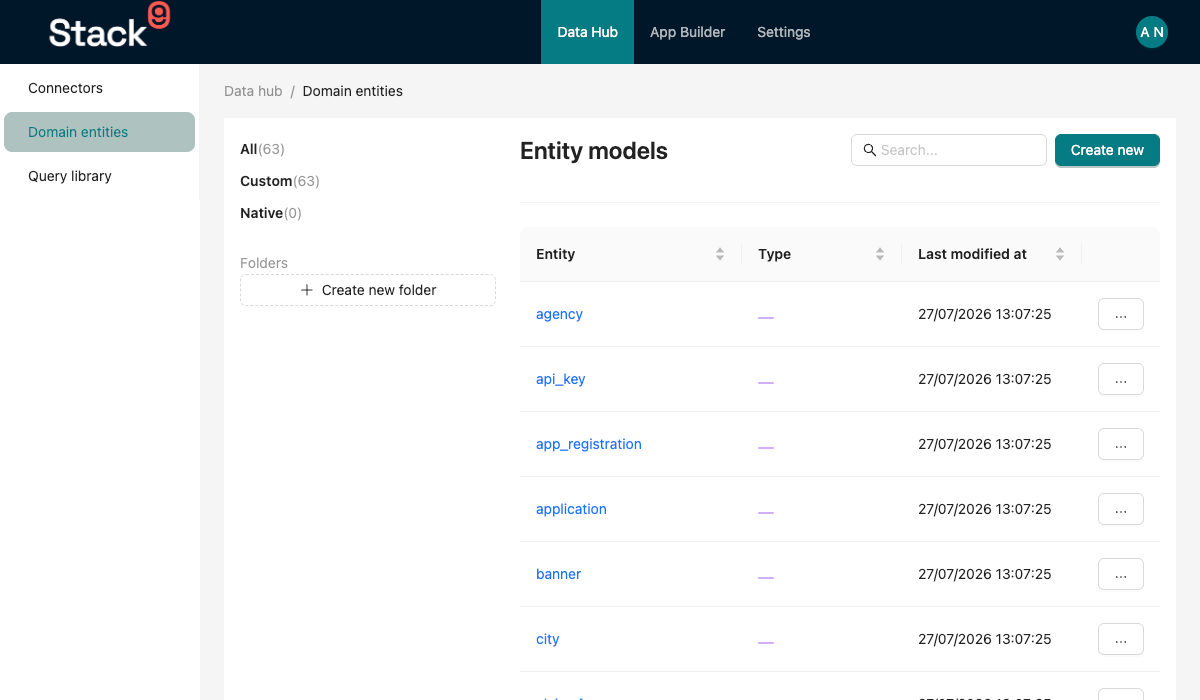
Entities are the foundation of every Stack9 application. An entity represents a business object (like Customer, Order, Product) and defines its data structure, validation rules, and relationships.
What is an Entity?
An entity is a JSON configuration file that tells Stack9:
- What fields the entity has
- What type each field is (text, number, date, etc.)
- How to validate the data
- What relationships exist with other entities
- What UI behaviors to apply
When you define an entity, Stack9 automatically:
- ✅ Creates a database table
- ✅ Generates REST API endpoints (CRUD)
- ✅ Creates TypeScript models
- ✅ Handles validation
- ✅ Manages relationships
- ✅ Provides audit logging
Entity File Structure
Entities are defined in src/entities/custom/{entity_name}.json:
{
  "head": {
    // Entity metadata
  },
  "fields": [
    // Field definitions
  ],
  "hooks": [
    // Optional validation hooks
  ]
}
Entity Head Configuration
The head section defines entity-level metadata:
{
  "head": {
    "name": "Customer",                    // Display name (singular)
    "key": "customer",                     // Unique identifier (lowercase, no spaces)
    "pluralisedName": "customers",         // Plural form
    "allowComments": true,                 // Enable comments feature
    "allowTasks": true,                    // Enable tasks feature
    "isActive": true,                      // Entity is active
    "maxAttachmentSizeAllowed": 30000000,  // 30MB max file size (null for no limit)
    "acceptedAttachmentFileTypes": [       // Allowed MIME types
      "image/jpg",
      "image/jpeg",
      "image/png",
      "application/pdf"
    ]
  }
}
Key Properties
| Property | Type | Required | Description |
|---|---|---|---|
name | string | Yes | Human-readable entity name |
key | string | Yes | Unique identifier (used in API endpoints) |
pluralisedName | string | Yes | Plural form of the name |
isActive | boolean | Yes | Whether entity is active |
allowComments | boolean | Yes | Enable comments on records |
allowTasks | boolean | Yes | Enable tasks on records |
maxAttachmentSizeAllowed | number | null | No | Max attachment size in bytes |
acceptedAttachmentFileTypes | string[] | No | Allowed file MIME types |
Field Types
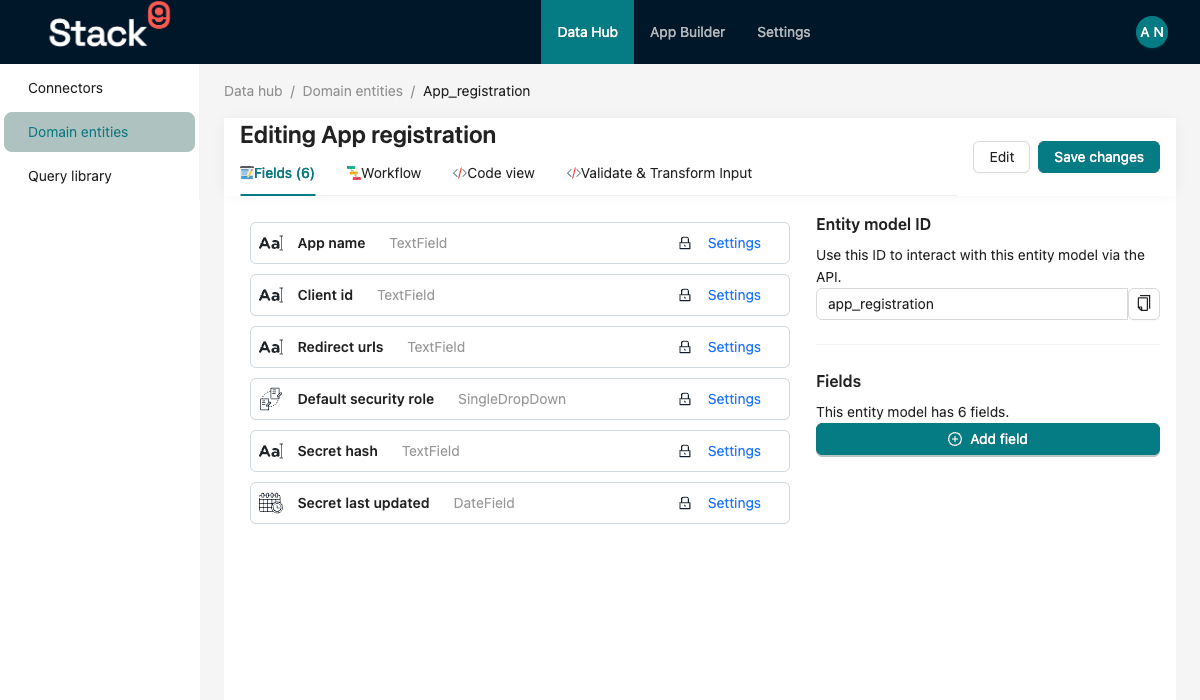
Stack9 supports various field types to model your data:
1. TextField
Single-line text input.
{
  "label": "Email Address",
  "key": "email",
  "type": "TextField",
  "placeholder": "Enter email address",
  "description": "Primary contact email",
  "validateRules": {
    "required": true,
    "maxLength": 100,
    "minLength": 5,
    "pattern": "^[^\\s@]+@[^\\s@]+\\.[^\\s@]+$"  // Email validation pattern
  },
  "typeOptions": {
    "multiLine": false,  // Single-line input
    "text": false  // Use varchar instead of text column
  },
  "behaviourOptions": {
    "readOnly": false
  }
}
Type Options:
multiLine: Enable multi-line text inputtext: Use text database column type instead of varcharsensitive: Mark field as containing sensitive data
Note: Use validation patterns for email, phone, or URL validation instead of a format property.
2. NumericField
Number input with validation.
{
  "label": "Age",
  "key": "age",
  "type": "NumericField",
  "validateRules": {
    "required": true,
    "min": 18,  // Minimum value (use min: 0 to prevent negatives)
    "max": 120
  },
  "typeOptions": {
    "precision": 0  // Number of decimal places
  }
}
Type Options:
precision: Number of decimal places
Note: To prevent negative values, use
min: 0in validateRules. There is noallowNegativeordecimalsproperty.
3. DateField
Date or datetime picker.
{
  "label": "Date of Birth",
  "key": "dob",
  "type": "DateField",
  "placeholder": "Select date",
  "typeOptions": {
    "time": false  // Set to true for datetime
  },
  "validateRules": {
    "required": true
  }
}
4. Checkbox
Boolean field (true/false).
{
  "label": "Is Active",
  "key": "is_active",
  "type": "Checkbox",
  "defaultValue": true,
  "description": "Whether the customer is active"
}
5. OptionSet
Dropdown with predefined values.
{
  "label": "Customer Type",
  "key": "customer_type",
  "type": "OptionSet",
  "typeOptions": {
    "values": ["Individual", "Business"]
  },
  "validateRules": {
    "required": true
  }
}
6. SingleDropDown
Foreign key relationship (Many-to-One).
{
  "label": "Sales Channel",
  "key": "sales_channel_id",
  "type": "SingleDropDown",
  "relationshipOptions": {
    "ref": "sales_channel"  // Related entity key
  },
  "typeOptions": {
    "label": "name"  // Field to display in dropdown
  },
  "validateRules": {
    "required": false
  }
}
7. MultiDropDown
Many-to-Many relationship.
{
  "label": "Available Times",
  "key": "available_times",
  "type": "MultiDropDown",
  "relationshipOptions": {
    "ref": "available_time"
  },
  "typeOptions": {
    "label": "{{period}}",      // Template for display
    "value": "{{id}}"           // Value field
  }
}
8. Grid
One-to-Many relationship (child records).
{
  "label": "Alternative Emails",
  "key": "alternative_emails",
  "type": "Grid",
  "relationshipOptions": {
    "ref": "alternative_email"  // Related entity
  },
  "typeOptions": {
    "relationshipField": "customer_id"  // FK field in child entity
  }
}
9. RichTextEditor
HTML content editor.
{
  "label": "Notes",
  "key": "notes",
  "type": "RichTextEditor",
  "description": "Additional notes about the customer"
}
Field Properties
All fields share these common properties:
| Property | Type | Required | Description |
|---|---|---|---|
label | string | Yes | Display label |
key | string | Yes | Database column name (snake_case) |
type | string | Yes | Field type |
placeholder | string | No | Placeholder text |
description | string | No | Help text |
defaultValue | any | No | Default value for new records |
validateRules | object | No | Validation rules |
behaviourOptions | object | No | UI behavior options |
typeOptions | object | No | Type-specific options |
index | boolean | No | Create database index |
Field descriptions
A field's description is one definition shared by people and AI agents:
- Forms — every form generated from the entity passes the description to the field component as its hint text, so you write it once rather than per form.
- AI agents —
yarn generate-modelscarries the description into the generated input models (as the field's schema description), and MCP query tools that derive their input schema from those models show it to agents as the argument description. An agent working with the field, including a Stack9 AI Agent, reads the same definition a user sees instead of guessing what the term means.
Write descriptions for both audiences: say what the value means and any format or unit, not just restate the label.
Validation Rules
{
  "validateRules": {
    "required": true,           // Field is required
    "maxLength": 100,          // Max string length
    "minLength": 5,            // Min string length
    "max": 999,                // Max numeric value
    "min": 0,                  // Min numeric value
    "pattern": "^[A-Z0-9]+$"   // Regex pattern
  }
}
Behaviour Options
{
  "behaviourOptions": {
    "readOnly": true,      // Field cannot be edited
    "hidden": false        // Hide field in forms
  }
}
Relationships
One-to-Many (Parent → Children)
Use the Grid field type in the parent entity:
Parent Entity (customer.json):
{
  "label": "Sales Orders",
  "key": "sales_orders",
  "type": "Grid",
  "relationshipOptions": {
    "ref": "sales_order"
  },
  "typeOptions": {
    "relationshipField": "customer_id"
  }
}
Child Entity (sales_order.json):
{
  "label": "Customer",
  "key": "customer_id",
  "type": "SingleDropDown",
  "relationshipOptions": {
    "ref": "customer"
  },
  "typeOptions": {
    "label": "name"
  }
}
Many-to-One (Child → Parent)
Use the SingleDropDown field type:
{
  "label": "Customer",
  "key": "customer_id",
  "type": "SingleDropDown",
  "relationshipOptions": {
    "ref": "customer"
  },
  "typeOptions": {
    "label": "name"
  }
}
Many-to-Many
Use the MultiDropDown field type:
{
  "label": "Tags",
  "key": "tags",
  "type": "MultiDropDown",
  "relationshipOptions": {
    "ref": "tag"
  },
  "typeOptions": {
    "label": "name",
    "value": "id"
  }
}
Stack9 automatically creates a junction table for many-to-many relationships.
Real-World Example
Here's a simplified Customer entity from a production Stack9 app:
{
  "head": {
    "name": "Customer",
    "key": "customer",
    "pluralisedName": "customers",
    "allowComments": true,
    "allowTasks": true,
    "maxAttachmentSizeAllowed": 30000000,
    "acceptedAttachmentFileTypes": [
      "image/jpg",
      "image/jpeg",
      "image/png",
      "application/pdf"
    ]
  },
  "fields": [
    {
      "label": "CRN",
      "key": "crn",
      "type": "NumericField",
      "description": "Unique customer reference number",
      "behaviourOptions": {
        "readOnly": true
      }
    },
    {
      "label": "Customer Type",
      "key": "customer_type",
      "type": "OptionSet",
      "typeOptions": {
        "values": ["Individual", "Business"]
      },
      "validateRules": {
        "required": true
      }
    },
    {
      "label": "First Name",
      "key": "name",
      "type": "TextField",
      "placeholder": "First name or Business Name",
      "validateRules": {
        "required": true,
        "maxLength": 100,
        "minLength": 1
      }
    },
    {
      "label": "Last Name",
      "key": "last_name",
      "type": "TextField",
      "validateRules": {
        "maxLength": 80
      }
    },
    {
      "label": "Email",
      "key": "email_address",
      "type": "TextField",
      "validateRules": {
        "required": true,
        "maxLength": 100,
        "pattern": "^[^\\s@]+@[^\\s@]+\\.[^\\s@]+$"
      }
    },
    {
      "label": "Phone",
      "key": "phone",
      "type": "TextField",
      "validateRules": {
        "maxLength": 13,
        "pattern": "^\\+?[1-9]\\d{1,14}$"
      }
    },
    {
      "label": "Date of Birth",
      "key": "dob",
      "type": "DateField",
      "typeOptions": {
        "time": false
      }
    },
    {
      "label": "Is Active",
      "key": "is_active",
      "type": "Checkbox",
      "defaultValue": true
    },
    {
      "label": "Sales Channel",
      "key": "sales_channel_id",
      "type": "SingleDropDown",
      "relationshipOptions": {
        "ref": "sales_channel"
      },
      "typeOptions": {
        "label": "name"
      }
    },
    {
      "label": "Sales Orders",
      "key": "sales_orders",
      "type": "Grid",
      "relationshipOptions": {
        "ref": "sales_order"
      },
      "typeOptions": {
        "relationshipField": "customer_id"
      }
    }
  ],
  "hooks": []
}
Auto-Generated Features
When you create this entity, Stack9 automatically generates:
Database Table
CREATE TABLE customers (
  id SERIAL PRIMARY KEY,
  crn INTEGER,
  customer_type VARCHAR(50),
  name VARCHAR(100) NOT NULL,
  last_name VARCHAR(80),
  email_address VARCHAR(100) NOT NULL,
  phone VARCHAR(13),
  dob DATE,
  is_active BOOLEAN DEFAULT true,
  sales_channel_id INTEGER REFERENCES sales_channels(id),
  _created_at TIMESTAMP DEFAULT NOW(),
  _updated_at TIMESTAMP DEFAULT NOW(),
  _created_by INTEGER,
  _updated_by INTEGER,
  _is_deleted BOOLEAN DEFAULT false
);
REST API Endpoints
GET    /api/customer/:id          - Get customer by ID
POST   /api/customer              - Create customer
PUT    /api/customer/:id          - Update customer
DELETE /api/customer/:id          - Soft delete customer
POST   /api/customer/search       - Search customers
POST   /api/customer/query        - Query with aggregations
TypeScript Models
interface Customer {
  id: number;
  crn?: number;
  customer_type?: 'Individual' | 'Business';
  name: string;
  last_name?: string;
  email_address: string;
  phone?: string;
  dob?: Date;
  is_active?: boolean;
  sales_channel_id?: number;
  _created_at?: Date;
  _updated_at?: Date;
  _created_by?: number;
  _updated_by?: number;
  _is_deleted?: boolean;
}
System Fields
Every entity automatically includes these system fields:
| Field | Type | Description |
|---|---|---|
id | integer | Primary key (auto-increment) |
_created_at | timestamp | Creation timestamp |
_updated_at | timestamp | Last update timestamp |
_created_by | integer | User who created the record |
_updated_by | integer | User who last updated the record |
_is_deleted | boolean | Soft delete flag |
Best Practices
1. Use Consistent Naming
- Entity keys:
customer,sales_order(lowercase, underscore) - Field keys:
first_name,email_address(snake_case) - Label everything clearly for non-technical users
2. Add Descriptions
{
  "label": "CRN",
  "key": "crn",
  "description": "Unique customer reference number - automatically generated"
}
3. Set Appropriate Validation
{
  "validateRules": {
    "required": true,
    "maxLength": 100,
    "minLength": 1
  }
}
4. Use Read-Only Fields for System-Generated Values
{
  "key": "crn",
  "behaviourOptions": {
    "readOnly": true
  }
}
5. Index Frequently Queried Fields
{
  "key": "email_address",
  "index": true
}
6. Group Related Fields Logically
Organize fields in the JSON in a logical order:
- Basic info first (name, email)
- Contact details next
- Relationships at the end
Common Patterns
Auto-Generated Sequence Numbers
{
  "label": "Order Number",
  "key": "order_number",
  "type": "NumericField",
  "behaviourOptions": {
    "readOnly": true
  }
}
Then use an entity hook to generate the sequence:
// entity-hooks/order.vat.ts
const orderNumber = await db.sequence.nextVal('sales_order', 1, 999999);
Conditional Fields
Conditional field display is typically handled through custom UI components or screen configurations, not at the entity level. Use behaviourOptions to control basic visibility:
{
  "label": "Business ABN",
  "key": "business_abn",
  "type": "TextField",
  "behaviourOptions": {
    "hidden": false  // Can be toggled via entity hooks based on conditions
  }
}
Note: Complex conditional logic should be implemented in entity hooks or custom UI components.
Calculated Fields
Define fields that are calculated in entity hooks:
{
  "label": "Age",
  "key": "age",
  "type": "NumericField",
  "behaviourOptions": {
    "readOnly": true
  }
}
Calculate in hook:
const age = dayjs().diff(dayjs(entity.dob), 'year');
Next Steps
Now that you understand entities, learn about:
- Screens - Create UIs for your entities
- Entity Hooks - Add custom business logic
- Query Library - Query your entity data
- Rest API - Using the Rest APIs
Related guides
- Creating Entities — build your first entity
- Entity Relationships — model relationships between entities