Action Types
Action Types are reusable TypeScript functions that define custom business logic for automations. They encapsulate complex operations into modular, testable units that can be used across multiple workflows.
What are Action Types?
Action Types are TypeScript classes that:
- Execute custom logic - Perform complex operations beyond simple CRUD
- Access all Stack9 services - Database, entity service, query library, workflows
- Accept parameters - Define typed inputs with validation rules
- Return structured responses - Pass data to subsequent actions or return to caller
- Handle errors gracefully - Built-in error handling and logging
When you define an action type, Stack9 automatically:
- ✅ Validates input parameters
- ✅ Provides access to services and context
- ✅ Manages error handling and logging
- ✅ Supports async operations
- ✅ Enables workflow chaining
Why Use Action Types?
Without Action Types (Inline Logic)
// Logic scattered across multiple automations
// Hard to test, hard to reuse, hard to maintain
app.post('/api/sync-customer', async (req, res) => {
  const { customerId } = req.body;

  // Fetch customer
  const customer = await db('customers').where({ id: customerId }).first();

  // Update search index
  await opensearch.index({
    index: 'customers',
    id: customer.id,
    body: customer,
  });

  // Send to queue
  await queue.send('customer-synced', customer);

  res.json({ success: true });
});
With Action Types (Stack9 Approach)
export class SyncCustomerData implements S9AutomationActionType {
  description = {
    name: 'Sync customer data',
    key: 'sync_customer_data',
    properties: [
      {
        name: 'customerId',
        label: 'Customer ID',
        type: S9InputTypes.ValueCodeMirror,
        rules: [{ required: true }],
      },
    ],
  };

  execute = async ({ params, services, next }: S9AutomationContext) => {
    const { customerId } = Params.check(params);
    await services.search.syncCustomer(customerId);
    next();
  };
}
Benefits:
- ✅ Reusable: Use same action across multiple automations
- ✅ Testable: Easy to unit test in isolation
- ✅ Type-safe: Full TypeScript type checking
- ✅ Discoverable: Shows up in automation builder
- ✅ Maintainable: Change once, update everywhere
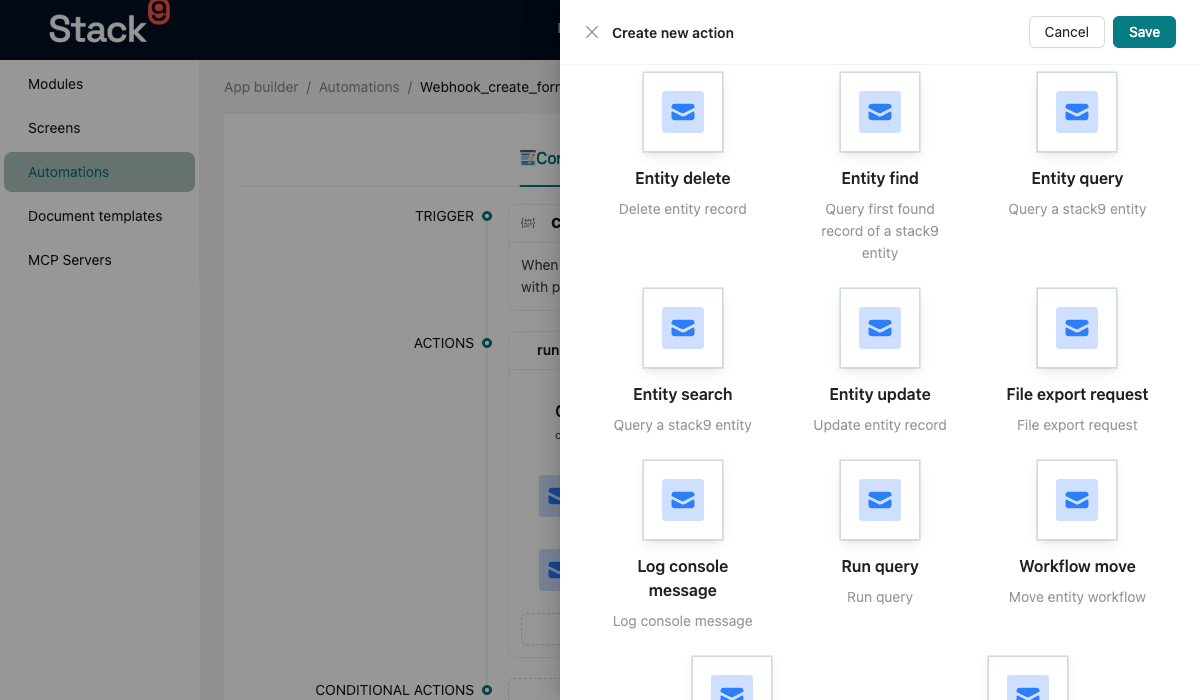
Action Type File Structure
Action types are defined in src/action-types/{action_name}.ts:
import {
  S9AutomationActionType,
  S9AutomationActionTypeDescription,
  S9AutomationContext,
  S9InputTypes,
} from '@april9au/stack9-sdk';
import * as rt from 'runtypes';

const Params = rt.Record({
  // Define parameters with types
  customerId: rt.Number,
});
type Params = rt.Static<typeof Params>;

export class ActionTypeName implements S9AutomationActionType {
  description: S9AutomationActionTypeDescription = {
    name: 'Human Readable Name',
    key: 'action_type_key',
    description: 'What this action does',
    icon: 'EmailIcon',
    properties: [
      // Define input parameters
    ],
  };

  execute = async (context: S9AutomationContext): Promise<void> => {
    // Your business logic here
    const { params, services, next } = context;
    const validatedParams = Params.check(params);

    // Do work...

    next(); // Continue to next action
  };
}
Action Type Description
The description object defines metadata for the automation builder:
description: S9AutomationActionTypeDescription = {
  name: 'Sync Customer Data', // Display name in UI
  key: 'sync_customer_data', // Unique identifier
  description: 'Syncs customer to search', // Help text
  icon: 'EmailIcon', // Icon in UI
  properties: [
    {
      name: 'customerId', // Parameter name
      label: 'Customer ID', // Display label
      type: S9InputTypes.ValueCodeMirror, // Input type
      rules: [{ required: true }], // Validation rules
    },
  ],
};
Input Types
enum S9InputTypes {
  ValueCodeMirror = 'ValueCodeMirror', // Template expression editor
  EntityDropDown = 'EntityDropDown', // Entity picker
  QueryDropDown = 'QueryDropDown', // Query picker
  TextArea = 'TextArea', // Multi-line text
  TextField = 'TextField', // Single-line text
  Boolean = 'Boolean', // Checkbox
  Number = 'Number', // Number input
  DatePicker = 'DatePicker', // Date picker
  OptionSet = 'OptionSet', // Dropdown with options
}
Automation Context
The S9AutomationContext provides access to everything you need:
interface S9AutomationContext {
  params: any; // Input parameters
  services: {
    entity: EntityService; // CRUD operations
    query: QueryService; // Execute queries
    workflow: WorkflowService; // Workflow operations
    message: MessageService; // Queue messages
    storage: StorageService; // File storage
    environmentVariable: EnvironmentVariableService; // Env vars
    batchProcess: BatchProcessService; // Batch operations
    cache: CacheService; // Caching
    logger: LoggerService; // Logging
  };
  db: {
    entity: EntityService; // Entity database service
    knex: Knex; // Knex query builder
  };
  user: {
    id: number; // Current user ID
    email: string; // Current user email
  };
  logger: LoggerService; // Logger instance
  environmentType: EnvironmentType; // 'dev' | 'staging' | 'prod'
  requestId: string; // The id this run is logged under
  correlationId: string; // The id to put on outbound calls
  next: (response?: any) => void; // Continue to next action
}
Request identity and the environment you run in
services.environmentVariable is always the environment of the request this run
belongs to, decrypted. On a DXP client the request may carry per-session overrides
(APP_S9_APIS_*), and those win over the deployment's own values, so reading
process.env directly gets you the wrong upstream. Conditional-action rules read
{{environment.KEY}} from the same service, so a condition and the actions it
selects always see one environment.
requestId / correlationId are the id every server-side log line for this run
already carries. Put correlationId on outbound calls (conventionally
x-request-id) so the upstream's logs can be joined to ours instead of the action
inventing an id of its own. They are equal today: Stack9 mints one id per request
(or per job) and propagates it.
Parameter Validation
Use runtypes for type-safe parameter validation:
import * as rt from 'runtypes';

// Simple parameters
const Params = rt.Record({
  customerId: rt.Number,
  emailAddress: rt.String,
  isActive: rt.Boolean,
});

// Optional parameters
const Params = rt.Record({
  customerId: rt.Number,
  notes: rt.String.optional(),
});

// Nested objects
const Params = rt.Record({
  customer: rt.Record({
    name: rt.String,
    email: rt.String,
  }),
});

// Arrays
const Params = rt.Record({
  customerIds: rt.Array(rt.Number),
});

// Union types
const Params = rt.Record({
  status: rt.Union(rt.Literal('active'), rt.Literal('inactive')),
});

// Constraints
const Params = rt.Record({
  age: rt.Number.withConstraint(n => n >= 18 || 'Must be 18 or older'),
});
Declaring an input contract (description.input)
params validation above happens inside execute, after the run has started. An
action type may instead — or as well — declare the contract for the input the
automation is entered with:
import { z } from 'zod';

const CreateRedirectInput = z
  .object({
    from: z.string(),
    to: z.string(),
    kind: z.enum(['permanent', 'temporary']).optional(),
  })
  .strict();

export class CreateRedirect implements S9AutomationActionType {
  description: S9AutomationActionTypeDescription = {
    key: 'CreateRedirect',
    name: 'Create redirect',
    icon: 'LinkIcon',
    properties: [
      /* … the automation-builder fields, unchanged … */
    ],
    input: CreateRedirectInput,
  };

  async execute(context: S9AutomationContext) {
    /* … */
  }
}
input is any object with a parse(unknown) method — a zod schema, or a runtypes
type wrapped in one. Zod is what earns the full benefit: a zod object is also
what the MCP schema is derived from.
What declaring it buys you, on a webhook automation:
Without input | With input | |
|---|---|---|
| Request body | unvalidated; the action's own params check is the only guard | parsed before the run starts — an invalid call runs nothing |
| Refusal | whatever the action throws mid-run | 422 Invalid input for action "<key>": …, identical to a server action's |
| MCP tool schema | the flat inputSchema hand-written in the MCP JSON | derived from this contract: nesting, enums, required-ness, .strict() |
Which action owns the contract
The first action of the automation — its entry action — and only it. The body a
caller sends is what the first action is entered with; every later action is fed
the previous one's next() output, so a contract on a later action would describe
input nobody supplies. Two consequences:
- An automation whose actions are all conditional (
conditionalActionswith noactions) has no entry action, because which action runs first depends on the very body being validated. It is not validated, and an MCP tool over it keeps its inline schema. - The same action type used as a later step in some other automation is unaffected; nothing validates its input there.
input is not params
input describes the automation's incoming body (trigger.body). params remains
what it always was: the action's own declared params from the automation JSON with
{{trigger.*}} / {{runbook.*}} interpolated. Declaring input does not change
what execute receives, so keep the params check you already have — an action
type that is a later step in another automation still needs it.
Non-webhook triggers (afterCreate, cronJob, mqHandler, …) are never validated
against input: their payload is built by the framework, not supplied by a caller.
Real-World Examples
Example 1: Sync Customer to Search Index
From a production Stack9 app:
import {
  S9AutomationActionType,
  S9AutomationActionTypeDescription,
  S9AutomationContext,
  S9InputTypes,
} from '@april9au/stack9-sdk';
import * as rt from 'runtypes';

import { CustomerOpenSearchService } from '../services/CustomerOpenSearchService';

const Params = rt.Record({ customerId: rt.Number });
type Params = rt.Static<typeof Params>;

export class SyncCustomerData implements S9AutomationActionType {
  description: S9AutomationActionTypeDescription = {
    name: 'Sync customer data',
    key: 'sync_customer_data',
    description: 'Sync customer data to OpenSearch',
    icon: 'EmailIcon',
    properties: [
      {
        name: 'customerId',
        label: 'Customer ID',
        type: S9InputTypes.ValueCodeMirror,
        rules: [{ required: true }],
      },
    ],
  };

  execute = async ({
    next,
    params,
    services,
    logger,
    db,
  }: S9AutomationContext): Promise<void> => {
    const { customerId } = Params.check(params);

    const service = new CustomerOpenSearchService(
      services.entity,
      services.batchProcess,
      services.queryLibrary,
      services.message.standard,
      db,
      logger,
    );

    await service.updateCustomer(+customerId);

    next();
  };
}
Example 2: Verify Customer
import {
  S9AutomationActionType,
  S9AutomationActionTypeDescription,
  S9AutomationContext,
  S9InputTypes,
} from '@april9au/stack9-sdk';
import * as rt from 'runtypes';

import { Customer } from '../models/stack9/Customer';

const Params = rt.Record({
  crn: rt.Number.withConstraint(n => Number.isInteger(n)),
});
type Params = rt.Static<typeof Params>;

export class VerifyCustomer implements S9AutomationActionType {
  description: S9AutomationActionTypeDescription = {
    name: 'Verify customer',
    key: 'verify_customer',
    description: 'Verify customer by CRN',
    icon: 'EmailIcon',
    properties: [
      {
        name: 'crn',
        label: 'CRN',
        type: S9InputTypes.ValueCodeMirror,
        rules: [{ required: true }],
      },
    ],
  };

  execute = async ({
    next,
    params,
    services,
    db,
  }: S9AutomationContext): Promise<void> => {
    const { crn } = Params.check(params);

    const customer = await services.entity.findOne(
      'customer',
      Customer.pick('id', 'name', 'last_name'),
      {
        $where: {
          _is_deleted: false,
          crn: crn,
          is_active: true,
        },
      },
    );

    if (!customer) {
      return next({
        response_code: 400,
        message: 'Invalid CRN',
        crn,
      });
    }

    return next({
      response_code: 200,
      crn: customer.crn,
      name: customer.name,
      last_name: customer.last_name,
    });
  };
}
Example 3: Get Customer Dashboard Data
export class GetCustomerDashboardData implements S9AutomationActionType {
  description: S9AutomationActionTypeDescription = {
    name: 'Get customer dashboard data',
    key: 'get_customer_dashboard_data',
    description: 'Fetch complete customer dashboard data',
    icon: 'EmailIcon',
    properties: [
      {
        name: 'token',
        label: 'Token',
        type: S9InputTypes.ValueCodeMirror,
        rules: [{ required: true }],
      },
    ],
  };

  execute = async ({
    next,
    params,
    services,
  }: S9AutomationContext): Promise<void> => {
    try {
      const { token } = Payload.check(params);

      // Decode token
      const { email } = await decodeToken(token);

      // Find customer
      const customer = await services.entity.findOne('customer', Customer, {
        $where: {
          is_active: true,
          _is_deleted: false,
          website_username: email,
        },
      });

      if (!customer) {
        throw new SystemError('Customer not found');
      }

      // Fetch sales orders
      const salesOrders = await services.entity.findAll(
        'sales_order',
        SalesOrder,
        {
          $where: {
            _is_deleted: false,
            customer_id: customer.id,
            _workflow_outcome: 'success',
          },
          $withRelated: [
            'sales_order_items(notDeleted)',
            'sales_order_items(notDeleted).game(notDeleted)',
          ],
        },
      );

      // Fetch subscriptions
      const subscriptions = await services.entity.findAll(
        'subscription',
        Subscription,
        {
          $where: {
            _is_deleted: false,
            customer_id: customer.id,
            _workflow_current_step: { $in: ['active', 'deferred'] },
          },
        },
      );

      return next({
        response_code: 200,
        data: {
          ...customer,
          sales_orders: salesOrders,
          subscriptions,
        },
      });
    } catch (error: unknown) {
      if (error instanceof SystemError) {
        return next({
          response_code: error.status,
          message: error.message,
        });
      }
      throw error;
    }
  };
}
Example 4: Send Notification
export class SendOutboundCorrespondence implements S9AutomationActionType {
  description: S9AutomationActionTypeDescription = {
    name: 'Send outbound correspondence',
    key: 'send_outbound_correspondence',
    description: 'Send email or postal correspondence',
    icon: 'EmailIcon',
    properties: [
      {
        name: 'correspondenceId',
        label: 'Correspondence ID',
        type: S9InputTypes.ValueCodeMirror,
        rules: [{ required: true }],
      },
    ],
  };

  execute = async ({
    next,
    params,
    services,
    logger,
    db,
    environmentType,
  }: S9AutomationContext): Promise<void> => {
    const { correspondenceId } = Params.check(params);

    const service = new OutboundCorrespondenceService(
      environmentType,
      services.entity,
      services.storage,
      services.environmentVariable,
      services.queryLibrary,
      services.workflow,
      services.batchProcess,
      logger,
      db,
    );

    await service.process(correspondenceId);

    next();
  };
}
Common Patterns
1. Query Data
execute = async ({ services, params, next }: S9AutomationContext) => {
  const { customerId } = Params.check(params);

  const customer = await services.entity.findOne('customer', Customer, {
    $where: { id: customerId },
    $withRelated: ['sales_orders', 'subscriptions'],
  });

  next({ customer });
};
2. Update Entities
execute = async ({ services, params, next }: S9AutomationContext) => {
  const { customerId, data } = Params.check(params);

  await services.entity.update('customer', customerId, {
    last_login_date: new Date(),
    ...data,
  });

  next({ success: true });
};
3. Execute Queries
execute = async ({ services, params, next }: S9AutomationContext) => {
  const { queryKey, queryParams } = Params.check(params);

  const result = await services.query.execute(queryKey, queryParams);

  next({ result });
};
4. Send to Queue
execute = async ({ services, params, next }: S9AutomationContext) => {
  const { orderId } = Params.check(params);

  await services.message.realtime.sendMessage({
    queue: 'process_order',
    body: JSON.stringify({ orderId }),
    entityType: 'sales_order',
    entityId: orderId,
  });

  next();
};
5. File Storage Operations
execute = async ({ services, params, next }: S9AutomationContext) => {
  const { fileName, fileContent } = Params.check(params);

  const url = await services.storage.upload(
    'document_storage',
    `uploads/${fileName}`,
    Buffer.from(fileContent),
  );

  next({ url });
};
6. Workflow Operations
execute = async ({ services, params, next }: S9AutomationContext) => {
  const { entityKey, entityId, action } = Params.check(params);

  await services.workflow.executeAction(entityKey, entityId, action);

  next({ success: true });
};
7. Error Handling
execute = async ({ services, params, next, logger }: S9AutomationContext) => {
  try {
    const { orderId } = Params.check(params);

    const result = await processOrder(orderId);

    next({ success: true, result });
  } catch (error) {
    logger.error('Order processing failed', { error, params });

    return next({
      response_code: 500,
      message: error.message,
      success: false,
    });
  }
};
8. Database Transactions
execute = async ({ db, params, next }: S9AutomationContext) => {
  const { customerId, data } = Params.check(params);

  await db.knex.transaction(async trx => {
    // Update customer
    await trx('customers').where({ id: customerId }).update(data);

    // Create audit log
    await trx('audit_logs').insert({
      entity_type: 'customer',
      entity_id: customerId,
      action: 'update',
      changes: JSON.stringify(data),
    });
  });

  next();
};
Using Action Types in Automations
Reference action types in your automation definitions:
{
  "key": "when_customer_created",
  "name": "When Customer Created",
  "entityKey": "customer",
  "triggerType": "afterCreate",
  "actions": [
    {
      "name": "Sync to search",
      "key": "sync_customer",
      "actionTypeKey": "sync_customer_data",
      "params": {
        "customerId": "{{trigger.entity.id}}"
      }
    },
    {
      "name": "Send welcome email",
      "key": "send_welcome",
      "actionTypeKey": "send_outbound_correspondence",
      "params": {
        "correspondenceId": "{{trigger.entity.welcome_correspondence_id}}"
      }
    }
  ]
}
Registering Action Types
Action types are automatically discovered from src/action-types/:
// src/action-types/index.ts
export { SyncCustomerData } from './syncCustomerData';
export { VerifyCustomer } from './verifyCustomer';
export { GetCustomerDashboardData } from './getCustomerDashboardData';
export { SendOutboundCorrespondence } from './sendOutboundCorrespondence';
Stack9 automatically registers all exported action types.
Best Practices
1. Keep Actions Focused
// ✅ Good - Single responsibility
export class SendWelcomeEmail implements S9AutomationActionType {
  execute = async ({ params, services, next }) => {
    await services.email.send('welcome', params);
    next();
  };
}

// ❌ Bad - Too many responsibilities
export class ProcessCustomerSignup implements S9AutomationActionType {
  execute = async ({ params, services, next }) => {
    await createCustomer();
    await sendWelcomeEmail();
    await syncToSearch();
    await notifySlack();
    await updateAnalytics();
    next();
  };
}
2. Validate All Parameters
// ✅ Good - Strict validation
const Params = rt.Record({
  email: rt.String.withConstraint(s => s.includes('@')),
  age: rt.Number.withConstraint(n => n >= 18),
  role: rt.Union(rt.Literal('admin'), rt.Literal('user')),
});

// ❌ Bad - No validation
const params: any = context.params;
3. Handle Errors Gracefully
// ✅ Good - Proper error handling
execute = async ({ params, services, next, logger }: S9AutomationContext) => {
  try {
    const result = await services.external.call(params);
    next({ success: true, result });
  } catch (error) {
    logger.error('External call failed', { error, params });
    return next({
      response_code: 500,
      message: 'Operation failed',
      success: false,
    });
  }
};

// ❌ Bad - Unhandled errors crash the automation
execute = async ({ params, services, next }) => {
  const result = await services.external.call(params);
  next({ result });
};
4. Use TypeScript Types
// ✅ Good - Full type safety
import { DBCustomer } from '../models/stack9/Customer';

const customer = await services.entity.findOne<DBCustomer>(
  'customer',
  DBCustomer,
  { $where: { id: customerId } },
);

// ❌ Bad - No type safety
const customer = await services.entity.findOne('customer', {} as any, {
  $where: { id: customerId },
});
5. Log Important Events
// ✅ Good - Helpful logging
execute = async ({ params, logger, next }: S9AutomationContext) => {
  logger.info('Processing order', { orderId: params.orderId });

  const result = await processOrder(params.orderId);

  logger.info('Order processed successfully', {
    orderId: params.orderId,
    result,
  });

  next({ result });
};
6. Name Actions Descriptively
// ✅ Good - Clear purpose
export class SyncCustomerToSearchIndex implements S9AutomationActionType {}
export class SendOrderConfirmationEmail implements S9AutomationActionType {}

// ❌ Bad - Unclear purpose
export class Action1 implements S9AutomationActionType {}
export class DoStuff implements S9AutomationActionType {}
7. Document Complex Logic
export class CalculateShippingCost implements S9AutomationActionType {
  execute = async ({ params, next }: S9AutomationContext) => {
    const { weight, destination } = Params.check(params);

    // Base rate: $5 + $0.50 per kg
    // International shipping adds 200% surcharge
    // Express shipping adds $10 flat fee
    const baseRate = 5 + weight * 0.5;
    const internationalSurcharge = destination.international ? baseRate * 2 : 0;
    const expressFee = params.express ? 10 : 0;

    const total = baseRate + internationalSurcharge + expressFee;

    next({ shippingCost: total });
  };
}
Testing Action Types
import { SyncCustomerData } from './syncCustomerData';

describe('SyncCustomerData', () => {
  it('should sync customer to search index', async () => {
    const mockContext = {
      params: { customerId: 123 },
      services: {
        entity: {
          findOne: jest.fn().mockResolvedValue({ id: 123, name: 'John' }),
        },
        search: {
          syncCustomer: jest.fn(),
        },
      },
      next: jest.fn(),
    };

    const action = new SyncCustomerData();
    await action.execute(mockContext as any);

    expect(mockContext.services.search.syncCustomer).toHaveBeenCalledWith(123);
    expect(mockContext.next).toHaveBeenCalled();
  });

  it('should handle errors', async () => {
    const mockContext = {
      params: { customerId: 999 },
      services: {
        search: {
          syncCustomer: jest.fn().mockRejectedValue(new Error('Not found')),
        },
      },
      logger: {
        error: jest.fn(),
      },
      next: jest.fn(),
    };

    const action = new SyncCustomerData();
    await action.execute(mockContext as any);

    expect(mockContext.logger.error).toHaveBeenCalled();
    expect(mockContext.next).toHaveBeenCalledWith(
      expect.objectContaining({ success: false }),
    );
  });
});
Next Steps
Now that you understand Action Types, learn about:
- Automations - Use action types in workflows
- Entity Hooks - Alternative for entity lifecycle logic
- Connectors - Connect to external services
- How-To: Build Custom Actions
Related guides
- Building Custom Actions — create custom action types